
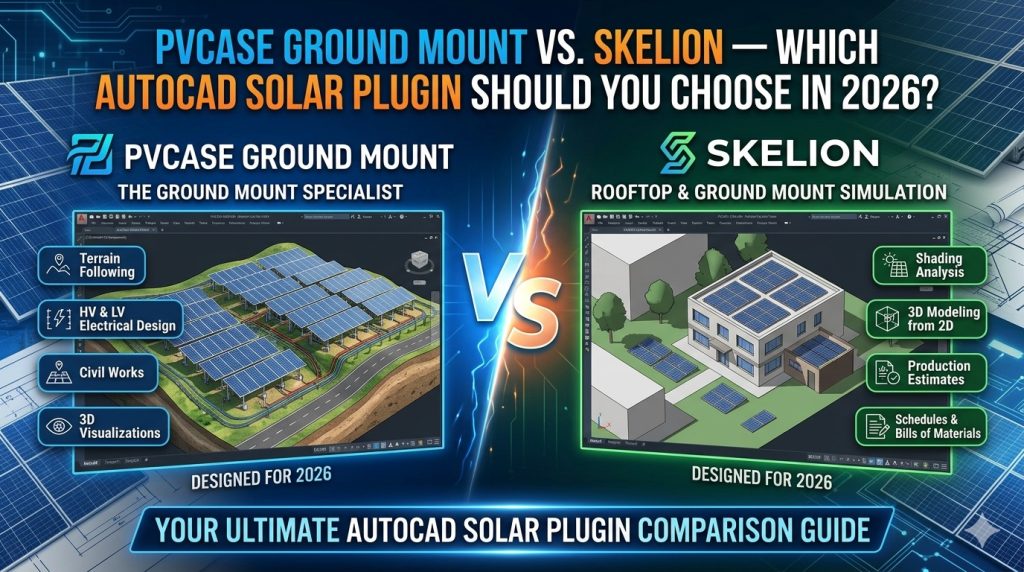
Solar design professionals frequently face this crossroads: PVcase Ground Mount or Skelion? Both are powerful tools for designing photovoltaic systems, but they target fundamentally different workflows, project scales, and engineering needs. Choosing the wrong one for your team means either paying for capability you’ll never use — or hitting a ceiling at exactly the wrong moment on a live project.
This article breaks down the two tools side by side, across every dimension that matters for professional solar engineering: platform, terrain modeling, electrical design, PVsyst integration, output quality, and total cost of ownership.
At a Glance: The Core Difference
The most important distinction is not features — it’s platform philosophy.
Skelion is a plugin for SketchUp, a general-purpose 3D modeling application. It gives SketchUp solar-specific capabilities: panel insertion, basic shading analysis, and energy estimation reports. It is accessible, affordable, and widely used for residential and small commercial projects.
PVcase Ground Mount is a native AutoCAD add-in engineered specifically for utility-scale ground-mounted PV plants. It does not simplify solar design — it industrializes it. Terrain-adaptive layout generation, detailed electrical design, construction drawing output, and direct PVsyst export are its core competencies.
If that distinction already tells you what you need, you can read our full PVcase Ground Mount guide here. If you need the full comparison, read on.
Platform and Environment
Skelion runs inside SketchUp Pro — a subscription-based 3D modeling tool that was not designed for engineering documentation. SketchUp excels at visual modeling and concept presentation. For solar, Skelion extends it with panel placement, azimuth control, and PVGIS/PVWatts-based energy estimates. But the underlying platform remains a design visualization tool, not an engineering production environment.
PVcase runs inside AutoCAD — the industry-standard platform for engineering documentation. If your deliverable is a construction-ready DWG file, a bill of materials, or a permit-level drawing package, you are already in the right environment. PVcase extends AutoCAD with solar-specific automation without removing any of AutoCAD’s native precision tools.
For teams where AutoCAD is already part of the standard workflow, PVcase adds capability with zero platform switching. For teams working primarily in SketchUp for visualization and proposals, Skelion is the natural fit.
Project Scale and Use Case
| Project Type | PVcase Ground Mount | Skelion (SketchUp) |
|---|---|---|
| Residential rooftop (< 50 kW) | Not recommended | ✅ Excellent fit |
| Small commercial (50 kW – 1 MW) | Possible but oversized | ✅ Good fit |
| C&I ground mount (1 MW – 10 MW) | ✅ Ideal | ⚠️ Stretched |
| Utility-scale (> 10 MW) | ✅ Primary use case | ❌ Not suitable |
| Canopy / carport structures | ⚠️ Limited | ✅ Strong 3D modeling |
| Tracker (1-axis) systems | ✅ Full support | ⚠️ Basic support |
Skelion’s sweet spot is residential and small commercial projects, particularly where visual proposals and 3D client presentations matter. PVcase’s sweet spot begins at the scale where terrain adaptation, electrical engineering, and construction documentation become non-negotiable.
Terrain Modeling and Site Adaptation
This is where the gap between the two tools is most significant for ground-mount projects.
Skelion allows you to import a 3D mesh from SketchUp and place panels on it, but terrain adaptation is essentially manual. You model the terrain, then position panels relative to it. For flat or gently sloped sites, this works adequately. For complex topography, it becomes time-consuming and error-prone.
PVcase Ground Mount ingests real Digital Elevation Model (DEM) data and point cloud files, then automatically adapts row placement to terrain contours. The software calculates cut-and-fill requirements, adjusts pile heights, and accounts for slope limits — automatically. A terrain-adaptive layout that might take a day of manual work in any other tool is generated in minutes.
For any project where site topography is a design input — which is most real-world ground-mount projects — PVcase’s terrain engine is in a different league entirely.
Shading Analysis
Skelion leverages SketchUp’s native shadow engine for shading visualization. You can see shadow projections across the 3D model for any time of day and year. For residential systems where shading from nearby structures matters, this is visually effective and useful for client communication. However, it does not produce the detailed inter-row shading loss matrices that bankable energy reports require.
PVcase calculates inter-row shading analytically for any geographic location, sun angle range, and row pitch configuration. The output feeds directly into PVsyst as a terrain-accurate shade scene file (.SHD), which means your shading losses in the energy yield simulation reflect the actual site geometry — not a simplified approximation.
If your project requires a P50/P90 energy yield report for project financing, PVcase’s shading output is the necessary starting point. Skelion’s shading visualization, while useful at small scale, does not satisfy this requirement.
Electrical Design
This is another area where the tools diverge sharply.
Skelion does not include electrical design features. There is no string sizing, no DC cable routing, no voltage drop analysis, and no single-line diagram generation. For residential installations, these elements are typically handled separately in a dedicated electrical tool or manually. For larger projects, the absence of electrical design in Skelion means adding another tool to the workflow — typically AutoCAD — which then requires manual coordination between the two environments.
PVcase Ground Mount includes a comprehensive electrical design module. String groupings, DC cable routing, cable length optimization, and bill of materials generation are all handled within AutoCAD. The software minimizes total cable length across the layout and produces a procurement-ready BOM. For projects where cabling costs represent a significant portion of the budget, this optimization has direct financial impact.
PVsyst Integration
Both tools can feed into PVsyst, but the workflows are very different in quality and effort.
With Skelion, a typical workflow involves designing in SketchUp, exporting geometry, and then manually recreating the shading scene in PVsyst. This duplication of work is time-consuming and introduces opportunities for inconsistency between the CAD layout and the energy model.
With PVcase, the integration is native and automatic. PVcase exports a PVsyst shade scene (.SHD), a project file (.PRJ), and a meteo file (.MET) directly from the AutoCAD layout. You open PVsyst, import the .PRJ file, and your terrain-accurate shading scene is already built. The round-trip between layout adjustment in PVcase and energy model update in PVsyst takes minutes — not hours. This is a decisive advantage for iterative design on large projects.
Output Quality and Deliverables
Skelion + SketchUp produces excellent 3D visualizations and client-facing proposals. The output format is inherently visual — renders, shadow studies, and energy estimates. For residential proposals and early-stage feasibility presentations, this is exactly what is needed.
PVcase + AutoCAD produces engineering deliverables: construction drawings, structural detail sheets, pile placement plans, cable routing diagrams, and bills of materials — all in standard DWG format ready for handoff to civil, structural, and procurement teams. These outputs satisfy EPC contractor requirements, permit authority submissions, and lender technical due diligence.
In short: Skelion produces presentation materials. PVcase produces engineering documentation.
Pricing and Licensing
| Item | PVcase Ground Mount | Skelion (SketchUp Pro required) |
|---|---|---|
| Base platform cost | AutoCAD (~$2,000/year) | SketchUp Pro (~$399/year) |
| Plugin license | Annual (enterprise pricing) | Free (basic) / Pro (~$133/year) |
| Total entry cost | High | Low to moderate |
| License type | Node-locked or floating | Per-seat subscription |
| Enterprise / multi-seat | ✅ Available | ✅ Available |
PVcase is significantly more expensive than Skelion, and that price difference is real. For a solo designer working on residential projects, Skelion’s cost structure is hard to beat. For an EPC contractor or engineering consultancy billing on multi-megawatt projects, PVcase’s ROI is justified within a single project cycle.
If PVcase licensing costs are a barrier — particularly for teams in markets where international software procurement is complex — contact our team via Telegram @DoCrackMe to discuss licensing options.
Full Feature Comparison Table
| Feature | PVcase Ground Mount | Skelion (SketchUp) |
|---|---|---|
| Platform | AutoCAD (native add-in) | SketchUp (plugin) |
| Best project scale | 1 MW and above | Residential to small commercial |
| Terrain / DEM import | ✅ Full DEM, point cloud | ⚠️ Manual mesh only |
| Terrain-adaptive layout | ✅ Automatic | ❌ Manual |
| Inter-row shading analysis | ✅ Analytical, export to PVsyst | ⚠️ Visual shadow engine only |
| Tracker (1-axis) support | ✅ Full | ⚠️ Basic |
| DC cable routing | ✅ Automated + optimized | ❌ Not included |
| Bill of materials | ✅ Auto-generated | ❌ Manual |
| PVsyst native export (.SHD/.PRJ) | ✅ Automatic | ❌ Manual reconstruction |
| Construction drawings (DWG) | ✅ Full AutoCAD output | ❌ Export to AutoCAD required |
| 3D visualization / proposals | ⚠️ Basic 3D in AutoCAD | ✅ Excellent (SketchUp native) |
| GIS shapefile import | ✅ Yes | ⚠️ Via Google Maps only |
| Entry cost | High | Low |
| Learning curve | Moderate (AutoCAD background needed) | Low to moderate |
Which Tool Should You Choose?
Choose Skelion if:
- Your projects are primarily residential or small commercial (under 1 MW)
- Client-facing 3D visualizations and proposals are a core deliverable
- Your team works in SketchUp and the transition to AutoCAD is not justified
- Budget is a primary constraint and the project pipeline does not require construction-grade documentation
Choose PVcase Ground Mount if:
- You are designing utility-scale or large C&I ground-mounted PV plants
- Your deliverable is construction-ready engineering documentation, not visual proposals
- You need terrain-adaptive layout generation for complex or sloped sites
- PVsyst integration is required for bankable energy yield reports
- Your team already works in AutoCAD or is moving toward professional EPC workflows
Many professional solar engineering firms use both tools: Skelion + SketchUp for early-stage feasibility and client proposals, PVcase for detailed engineering and construction documentation. They serve different phases of the same project rather than competing directly.
Frequently Asked Questions
Can Skelion replace PVcase for utility-scale projects?
No. Skelion is not designed for utility-scale solar. It lacks terrain-adaptive layout generation, native PVsyst export, and the electrical design tools that utility-scale engineering requires. At 10 MW and above, attempting to use Skelion as the primary design tool would require significant manual workarounds that eliminate any time-saving benefit.
Does PVcase support rooftop solar design?
PVcase offers a separate product — PVcase Roof Mount — for rooftop and commercial rooftop installations. PVcase Ground Mount is specifically designed for ground-mounted utility-scale plants and is not the right tool for residential rooftop work.
Is Skelion still actively developed in 2026?
Skelion continues to receive updates, though its development pace is slower than PVcase. It remains the most widely used solar plugin for SketchUp, with an active user community.
Can I use PVcase and Skelion on the same project?
Yes, and this is a common workflow. Skelion + SketchUp handles early-stage visualization and client presentations. PVcase handles detailed engineering, electrical design, and PVsyst-ready documentation. The two tools complement each other across different project phases.
What is the difference between PVcase Ground Mount and PVcase Roof Mount?
PVcase Ground Mount is designed for utility-scale ground-mounted PV plants with terrain modeling, tracker support, and large-scale electrical design. PVcase Roof Mount targets commercial and industrial rooftop installations with different layout logic and structural considerations. They are separate licensed products.
Get a license — free consultation
Pricing depends on version and number of users. Message us on Telegram and we’ll reply with an exact quote — no commitment required.
|
✓
20+ years experience
Software engineers with a long track record
|
⚡
Delivered within 24h
Your license is sent within one business day
|
↩
Money-back guarantee
If the license doesn’t work, we refund in full
|
Usually reply within a few hours — free consultation, no upfront payment




