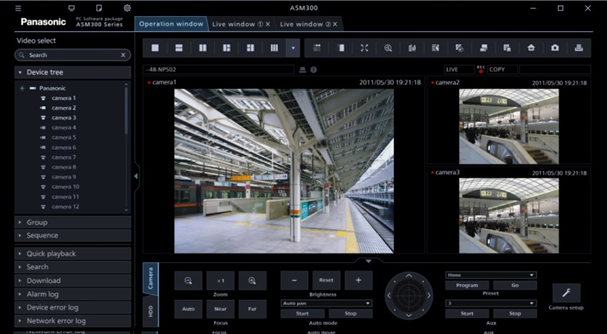
What Is Panasonic WV-ASM300?
The Panasonic WV-ASM300 (also known as i-PRO Management Software) is Panasonic’s enterprise-grade Video Management Software (VMS) for centralized management of large-scale IP surveillance deployments. It is the top-tier product in Panasonic’s ASM software series — positioned above WV-ASM200, WV-ASM100, and WV-ASM10 — designed for multi-site, multi-recorder installations requiring scalable camera management, advanced analytics integration, and end-to-end encryption.
The software manages the full ecosystem of Panasonic i-PRO cameras, NVRs, DVRs, encoders, and network microphones through a unified client interface. Version 7.60 is the current release used in most active deployments.
Key numbers:
- Up to 100 NVRs/DVRs connected per server
- Up to 64 encoders
- Up to 256 cameras registered directly in the software
- Up to 6,400–12,800 cameras registered in connected recorders (automatically indexed)
- Expandable to thousands of cameras through extension software modules
WV-ASM300 is now marketed under the i-PRO brand following Panasonic’s security division rebranding, though the product model number remains WV-ASM300.
Who Uses WV-ASM300?
- Security integrators deploying Panasonic i-PRO camera systems for enterprise clients
- Corporate security teams managing multi-building or multi-site surveillance
- Critical infrastructure operators requiring AES-256 encrypted end-to-end video
- Government and public safety installations needing high camera counts with tamper detection
- Retail and logistics facilities requiring heat map analytics and people counting
- Financial institutions deploying high-security encrypted surveillance
WV-ASM300 Product Editions
WV-ASM300 (Standard)
The base Windows application supporting H.264 cameras and recorders. Base capacity: 100 recorders, 64 encoders, 256 direct cameras.
WV-ASM300W (H.265 Edition)
Adds support for H.265 (HEVC) i-PRO Extreme cameras and recorders. The “W” suffix indicates H.265 compatibility. For new deployments using current-generation Panasonic cameras, WV-ASM300W is the version to deploy.
WV-ASM300 Free Limited Version
A free tier supporting up to 16 cameras and 1 recorder — no license fee or annual fees required. This allows small installations to use the WV-ASM300 interface without cost, and provides a genuine evaluation environment for larger deployments before purchasing.
Core Features
Multi-Monitor 4K Interface
WV-ASM300 provides a 4K-native GUI across three primary monitor types:
- LIVE monitor — real-time camera feeds with configurable multi-screen layouts (1, 4, 9, 16, up to 64 cameras per screen with WV-ASE202 extension)
- MAP monitor — interactive floor plan / site map with camera icons showing alarm status
- OPERATION monitor — playback, search, and download of recorded footage
All three monitor types support 4K resolution natively. The interface supports 16:9, 4:3, and 9:16 (corridor format) aspect ratios simultaneously on the same screen — important for installations using PTZ cameras and vertical corridor cameras on the same layout.
Automatic Camera Configuration Wizard
The built-in setup wizard auto-discovers cameras and recorders on the network, associates cameras to their recording NVRs, and pushes configuration to devices — significantly reducing manual setup time for large deployments. This three-step wizard covers: auto-detect devices → associate cameras to recorders → push configuration.
AES-256 End-to-End Encryption
When deployed with i-PRO Extreme cameras and recorders, WV-ASM300 enables full end-to-end AES-256 bit encryption of video streams — from camera to recorder to VMS client. This is a significant differentiator for mission-critical security applications where video data integrity must be guaranteed.
Additionally:
- Camera SD cards with full-encryption video recording can be securely downloaded and decrypted only within the authorized WV-ASM300 environment
- SSL/TLS communication between software components
- Tampering detection — alerts when video streams are interfered with or interrupted
- Symantec Device Certificates for camera authentication
WV-CU950 Hardware Controller Integration
WV-ASM300 includes native support for the Panasonic WV-CU950 system controller — a dedicated hardware unit with:
- Physical joystick for direct PTZ camera control
- Jog/shuttle dial for frame-accurate video playback
- Dedicated buttons for alarm acknowledgment, camera selection, and recording control
This integration is built into the base WV-ASM300 license — no extension module required.
Alarm Management
- Up to 16 alarm images displayed simultaneously on the live monitor
- Camera icon on the map illuminates when an alarm triggers at that camera location
- On-screen alarm message with audible buzzer
- Alarm log: up to 30,000 alarm events stored
- Operation log: up to 100,000 operation records
- System log: up to 1,000 entries
- Free-text comments attachable to alarm records for documentation
User Management
- Up to 32 users plus one administrator account
- User IDs: 4–32 characters
- Passwords: 8–32 characters with configurable expiry (31/92/184/366 days or OFF)
- 6 programmable user permission levels — granular control over which functions each operator can access (live view only, playback, download, configuration, etc.)
- Auto-login option for dedicated operator workstations
Recording and Playback
- Live video display with simultaneous playback from recorder storage
- Recorded image download — download footage directly from recorder/camera to PC hard drive
- ROI (Region of Interest) digital zoom during playback for detail examination
- Hash value verification on downloaded footage (ND Viewer integration) — proves footage authenticity for legal/forensic purposes
- Quick snapshot capture of operation monitor display
- Dual-stream support: view H.265 and H.264 streams simultaneously (useful when adding new-generation cameras to existing H.264 systems)
Heat Map Display (Extension)
The heat map analytics function (available as an extension) generates visual overlays showing movement density patterns across camera views over time — widely used in retail for customer flow analysis, store layout optimization, and staff deployment planning.
Extension Software Modules
WV-ASM300’s base capacity can be extended with optional licensed modules:
WV-ASE202 — Additional Live View License
Expands the live monitor to display up to 64 cameras simultaneously in a single live window. The base software supports a maximum number of live screens without this license.
WV-ASE203 — Additional Camera/Recorder License
Expands the maximum number of connected cameras, recorders, and encoders beyond the base limits. Up to 4× WV-ASE203 licenses can be added, expanding capacity to:
- 500 recorders maximum
- 320 encoders maximum
- Camera counts scale accordingly
Video Analytics Extension
Activates advanced AI analytics functions when used with compatible Panasonic cameras equipped with on-camera analytics:
- Face detection and recognition (with WV-ASF950 facial recognition server)
- Motion detection and intrusion alerts
- People counting
- Heat map generation
- Object classification
Analytics are activated via a Registration Key issued through Panasonic’s Key Management System.
WV-ASF950 Facial Recognition Server
A companion server application that integrates with WV-ASM300 for facial recognition-based alarm search. Requires compatible i-PRO cameras with face capture capability. The integration adds a search-by-category function to the alarm search tab.
Installation Guide
System Requirements
| Component | Minimum | Recommended |
|---|---|---|
| OS | Windows 10 (64-bit) | Windows 10/11 Pro (64-bit) |
| CPU | Intel Core i5 | Intel Core i7 or Xeon |
| RAM | 8 GB | 16 GB |
| Storage | 80 GB free | SSD, 200+ GB |
| GPU | DirectX 11 capable | Dedicated GPU for 4K multi-monitor |
| Display | 1920 × 1080 | 4K display |
| Network | 1 Gbps | 1 Gbps (dedicated NIC recommended) |
| .NET | .NET Framework 4.6.2 | .NET Framework 4.6.2 or later |
Important: Panasonic recommends a dedicated PC for WV-ASM300 to prevent conflicts with other software and maintain optimal performance. Do not install alongside other Panasonic VMS products (WV-ASM200, WV-ASM100, WV-ASM10, WV-AS65).
Pre-Installation Checklist
- Verify no other Panasonic VMS is installed (uninstall first if upgrading from an older ASM version)
- Ensure .NET Framework 4.6.2 is installed (the WV-ASM300 installer auto-installs it if absent)
- Configure Windows Firewall to allow WV-ASM300 communication (TCP ports used by ASM300 and camera/recorder discovery)
- Note the PC’s MAC address or hardware ID — needed for license key generation
- Prepare Registration Key from Panasonic’s Key Management System
Installation Steps
- Insert the WV-ASM300 DVD-ROM (or mount the ISO)
- Navigate to the
1 Video Surveillance Softwarefolder - Run
setup.exeas Administrator - .NET Framework 4.6.2 installs automatically if not present — wait for completion
- The WV-ASM300 installer launches — follow the on-screen wizard
- Accept the license agreement
- Choose installation directory (default:
C:\Program Files (x86)\Panasonic\ASM300) - Configure Windows Firewall exceptions when prompted
- Complete installation and reboot the PC
License Activation
- Launch WV-ASM300 from the Start menu
- The software opens in Demo Mode if no license is registered (limited trial period)
- Navigate to Administration → License Registration
- Enter the Registration Key from your Activation Key Card
- The software connects to Panasonic’s Key Management System to validate and activate
For Demo Mode: Register the demo edition Registration Key to enable full features for the trial period. The demo period for WV-ASM300 is 90 days (note: if a WV-ASM200 demo was previously run on the same PC, the trial period may already be partially consumed).
Important backup notice before upgrading: Before upgrading from a previous version, back up the setup database. These settings are NOT automatically preserved during upgrade:
- Basic setup: Language, Date format, Time format
- Drawing setup: Contrast, Audio settings
- GUI display setup: Full screen display preferences
- Performance setup: HD300 Live settings
Registering Cameras and Recorders
Method 1 — Auto-Discovery (Recommended)
- Open Device Registration from the main menu
- Click Auto Search — WV-ASM300 scans the network for Panasonic i-PRO devices
- Discovered cameras and recorders appear in the device list
- Select devices to register and click Register
- Use the Camera/Recorder Configuration Wizard to automatically associate cameras with their NVRs and push settings
Method 2 — Manual Registration
For devices not discovered automatically (different subnet, NAT traversal):
- Open Device Registration
- Click Add Device Manually
- Enter the device IP address, model type, and authentication credentials
- Click Register
Importing Camera Lists
For large deployments, camera information can be bulk-imported from a CSV/spreadsheet file rather than registering devices one by one. This is the recommended approach for installations with hundreds of cameras.
Multi-Monitor Configuration
WV-ASM300 supports up to 4 physical monitors per workstation (with appropriate GPU):
- Monitor 1: LIVE monitor (multi-camera real-time view)
- Monitor 2: MAP monitor (site plan with camera status)
- Monitor 3: OPERATION monitor (playback and search)
- Monitor 4: Additional live or alarm display
The 4K native GUI renders cleanly across all four monitors without scaling artifacts. For deployments requiring more than 4 monitors, multiple WV-ASM300 client instances can be distributed across separate workstations, all connecting to the same recorder/camera infrastructure.
WV-ASM300 vs. Third-Party VMS for Panasonic Systems
| Aspect | WV-ASM300 | Milestone XProtect | Genetec Security Center |
|---|---|---|---|
| Panasonic camera depth | ✅ Native, full feature set | ✅ Good (via ONVIF/driver) | ✅ Good (via ONVIF/driver) |
| AES-256 end-to-end encryption | ✅ Native with i-PRO Extreme | ❌ | ❌ |
| WV-CU950 hardware controller | ✅ Native | ❌ | ❌ |
| Panasonic analytics integration | ✅ Deep native | Via plugin | Via plugin |
| Multi-brand camera support | Panasonic/ONVIF | 13,000+ models | Thousands of models |
| License model | Per-server + extensions | Per-channel | Per-channel |
| No annual fees | ✅ | ❌ (annual care) | ❌ (annual care) |
| Free 16-camera tier | ✅ | ❌ | ❌ |
| Enterprise scalability | Large | Enterprise | Enterprise |
| Access control integration | Limited | Via plugins | Native Synergis |
When WV-ASM300 is the right choice: Your deployment is predominantly or entirely Panasonic i-PRO cameras. You need native AES-256 encryption from camera to VMS. You want native WV-CU950 hardware controller support. You prefer a per-server licensing model without annual per-camera fees.
When Milestone or Genetec is better: Your deployment includes cameras from multiple manufacturers. You need native access control integration. You require an enterprise-grade platform with multi-vendor hardware support and a large ecosystem of third-party integrations.
Common Issues and Troubleshooting
Software Opens in Demo Mode After License Registration
Cause: The PC’s hardware profile has changed since license activation (e.g., MAC address change, NIC replacement), or the Registration Key was entered incorrectly.
Fix: Re-enter the Registration Key via Administration → License Registration. If the hardware changed, contact Panasonic support to reissue the license for the new hardware profile.
Cameras Not Discovered During Auto-Search
Causes:
- Camera is on a different subnet from the ASM300 PC (auto-discovery uses broadcast, which doesn’t cross router boundaries)
- Windows Firewall blocking discovery packets
- Camera not yet assigned an IP address
Fix: Use manual registration with the camera’s IP address for cross-subnet devices. Ensure Panasonic firewall exceptions are configured correctly.
3D Dewarp Function Not Displaying Correctly
For 360° fisheye cameras with 3D dewarp enabled:
- Update the video card driver to the latest version
- Connect the operation monitor display to an external GPU (not the integrated graphics)
- Avoid using two graphics boards simultaneously (not supported)
Demo Trial Period Already Expired
If the PC previously ran a WV-ASM200 demo, the shared trial counter may be partially consumed. Upgrade to the latest WV-ASM300 version first — the DEMO Ver 1.00 had this issue. Current versions reset the counter properly.
Performance Issues with H.265 Streams
H.265 decoding requires a 64-bit OS and more GPU resources than H.264. Ensure:
- Windows 64-bit is installed
- Dedicated GPU is present (integrated graphics often insufficient for multi-channel H.265)
- GPU drivers are current
Frequently Asked Questions
Does WV-ASM300 require annual license fees? No. WV-ASM300 uses a perpetual per-server license model with no annual camera channel fees. Extension software modules (WV-ASE202, WV-ASE203) are also perpetual one-time purchases.
Can WV-ASM300 manage non-Panasonic cameras? WV-ASM300 can connect to ONVIF-compliant cameras from other manufacturers, but with limited feature depth compared to native Panasonic i-PRO cameras. Advanced features like AES-256 encryption, deep analytics integration, and SD card encrypted download are only available with Panasonic i-PRO hardware.
How many simultaneous client workstations can connect? Multiple WV-ASM300 client instances can run simultaneously, all accessing the same recorder/camera infrastructure. The software uses a client-server model where the main ASM300 installation acts as the management hub.
Is WV-ASM300 compatible with older Panasonic cameras (WV-series legacy)? Yes. WV-ASM300 supports both current i-PRO Extreme H.265 cameras and legacy i-PRO H.264 cameras. Mixed environments with both generations are fully supported.
What is the difference between WV-ASM300 and WV-ASM300W? The “W” suffix indicates H.265 (HEVC) support for the new i-PRO Extreme platform cameras and recorders. WV-ASM300W also includes all WV-ASM300 features. For deployments with any current-generation Panasonic cameras, WV-ASM300W is the correct version.
Where do I get the Registration Key? Registration Keys are obtained through Panasonic’s Key Management System at: https://eww.netreg.panasonic.co.jp/ipkms/pc/home.htm. You will need the MPR ID displayed on your ASM300 installation. Keys can also be mobile-issued for field activation.
Summary
Panasonic WV-ASM300 is the recommended VMS for deployments built on the Panasonic i-PRO ecosystem. Its native AES-256 end-to-end encryption, deep i-PRO camera analytics integration, hardware controller support, and perpetual licensing without annual channel fees make it the optimal choice for organizations committed to the Panasonic surveillance platform.
For mixed-brand deployments or those requiring native access control integration, third-party platforms like Milestone XProtect offer broader hardware compatibility — but at the cost of losing Panasonic-specific capabilities like end-to-end encryption and native hardware controller support.
Get a license — free consultation
Pricing depends on version and number of users. Message us on Telegram and we’ll reply with an exact quote — no commitment required.
|
✓
20+ years experience
Software engineers with a long track record
|
⚡
Delivered within 24h
Your license is sent within one business day
|
↩
Money-back guarantee
If the license doesn’t work, we refund in full
|
Usually reply within a few hours — free consultation, no upfront payment