What Is OPC Expert?
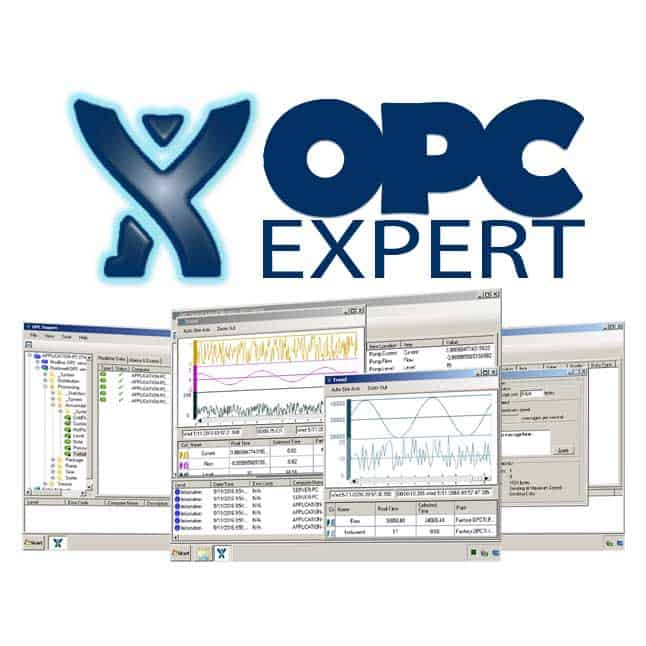
OPC Expert is a professional OPC monitoring, troubleshooting, and utility software developed by the OPC Training Institute (OPCTI). It is the industrial automation community’s most widely used tool for diagnosing and resolving OPC communication problems — from DCOM configuration errors and connection failures to real-time data monitoring, OPC tunneling, and database archiving.
What makes OPC Expert unique among OPC tools is its combination of zero-installation deployment (runs as a single executable from a USB stick), automatic problem detection with plain-language explanations, and a comprehensive feature set covering virtually every OPC-related task an automation engineer might need — all in one application.
Version 9.4 is the current release. OPC Expert supports the full range of OPC specifications:
- OPC DA (Data Access) 1.0a, 2.0, 2.05a, 3.0 — the classic COM/DCOM-based protocol
- OPC A&E (Alarms and Events)
- OPC HDA (Historical Data Access)
- OPC .NET (OPC Xi) — the .NET-based OPC interface
- OPC UA (Unified Architecture) — both Data Access and Historical Access
Who Uses OPC Expert?
- Automation engineers troubleshooting data connectivity between PLCs, SCADA, and HMI systems
- Control system integrators validating OPC server/client communication during commissioning
- Plant maintenance technicians diagnosing why data has stopped flowing from a PLC to a historian or SCADA
- IT/OT convergence teams resolving DCOM and Windows security issues blocking OPC communication
- OPC server developers testing their servers against real client behavior
- System administrators monitoring OPC infrastructure health in production facilities
The Core Problem OPC Expert Solves: DCOM
To understand why OPC Expert is so valuable, you need to understand the central challenge of OPC Classic (DA, A&E, HDA) — its dependency on Windows DCOM (Distributed Component Object Model).
OPC Classic was built on Microsoft’s COM/DCOM technology in the late 1990s. DCOM allows software components on different Windows machines to communicate over a network. When it works, it’s transparent. When it fails, it produces cryptic error messages, access-denied errors, and connectivity problems that can take hours or days to diagnose without the right tools.
Common DCOM problems that break OPC connectivity:
- Incorrect DCOM machine-level security permissions
- Windows Firewall blocking DCOM ports (TCP 135 and dynamically assigned high ports)
- Windows security updates (especially KB5004442 and related patches) changing DCOM authentication requirements
- Authentication mismatches between OPC server and client machines
- Incorrect “Identity” settings for DCOM components
- Domain vs. workgroup trust issues between machines
Before OPC Expert, diagnosing these issues required deep knowledge of Windows DCOM configuration, the dcomcnfg tool, Windows event logs, and specific OPC knowledge. OPC Expert automates this entire diagnostic process and presents results in plain language with specific remediation steps.
Key Features
Automatic OPC and DCOM Diagnostics
This is OPC Expert’s flagship capability. When connecting to an OPC server, OPC Expert:
- Tests each component of the OPC connection path individually
- Identifies exactly where the failure occurs
- Displays a clear explanation of what went wrong, why it happened, and step-by-step instructions to fix it
The visual feedback is immediate — a checkmark (✓) indicates a healthy component, an exclamation mark (!) indicates a problem requiring attention. Double-clicking a warning message opens a detailed description with the exact remediation steps.
This systematic approach isolates whether the problem is at the network level, the DCOM permissions level, the OPC server authentication level, or the item/tag configuration level — dramatically reducing the time to diagnose connectivity issues.
OPC Server Browser and Item Viewer
OPC Expert provides a hierarchical browser for navigating OPC server address spaces:
- Entire Network discovery — automatically discovers OPC servers on local and remote machines across the network
- Address space navigation — drill into OPC server namespaces to find items and tags
- Real-time subscription — subscribe to OPC items and watch live values, quality, and timestamps update
- Quality display — OPC quality codes (GOOD, UNCERTAIN, BAD) are displayed with human-readable explanations
- Multiple simultaneous connections — connect to multiple OPC servers on different machines at the same time
Real-Time Trending
With one click, OPC Expert launches a real-time trend chart for any subscribed OPC item:
- Live scrolling chart of OPC values over time
- Historical trend review of collected data
- Designed for 24×7 continuous operation — suitable for extended monitoring sessions
- Engineers can visually identify communication glitches, process anomalies, and intermittent problems that don’t show up in a single point-in-time reading
OPC Monitor — Continuous Health Monitoring
The OPC Monitor feature performs continuous automated health checking of OPC communication components:
- Continuously polls OPC servers and items to verify data is flowing
- Immediate detection when an OPC connection drops or an item quality goes BAD
- Operates unattended — no human interaction required
- Detects problems that only appear intermittently under specific conditions
This is particularly valuable for production environments where intermittent OPC failures cause sporadic SCADA data gaps that are difficult to catch manually.
OPC Tunneling
OPC tunneling solves one of the most common problems in DCOM-based OPC systems — the difficulty of routing OPC DA communication across firewalls, VPNs, or between machines in different Windows domains or workgroups.
Classic OPC DA uses DCOM, which requires multiple TCP ports to be open and specific Windows security configuration to function across network boundaries. In many enterprise environments, IT security policies make proper DCOM configuration across firewalls impractical or impossible.
OPC Expert’s built-in tunneling feature:
- Wraps OPC DA data in a single TCP connection that traverses firewalls cleanly
- Eliminates the need for DCOM configuration across network boundaries
- Provides a simple alternative to complex DCOM network setup
- Works through NAT, VPNs, and across the internet
This is especially useful for multi-site operations, remote access scenarios, and hybrid IT/OT networks where direct DCOM communication is not feasible.
OPC Bridging
OPC bridging connects two OPC servers together, allowing data to flow from one server to another without requiring a third-party SCADA or historian in between:
- Connect Server A (source) to Server B (destination)
- Items from Server A are written to corresponding items in Server B
- Useful for aggregating data from multiple OPC servers to a single destination
- Enables data replication between control system levels
- Supports cross-vendor OPC connectivity — bridge a Siemens OPC server to an Allen-Bradley OPC server, for example
OPC Data Archiving
OPC Expert can act as a lightweight OPC data archiver, capturing OPC data to multiple storage destinations:
Storage destinations:
- Microsoft SQL Server (MS SQL) — for enterprise integration and SQL-queryable historical data
- CSV files — simple comma-separated value files for spreadsheet import
- XML files — structured data archiving
- MQTT — publish OPC data to MQTT brokers for IIoT and cloud integration
This makes OPC Expert a practical substitute for a full historian in small or test environments, and a useful tool for capturing specific OPC data points for analysis without deploying a dedicated historian product.
OPC to Microsoft Excel Integration
OPC Expert includes a dedicated Excel add-in that enables real-time OPC data display directly in Microsoft Excel spreadsheets:
- Drag and drop OPC items from the OPC Expert browser directly into Excel cells
- Cells update in real-time as OPC values change
- Supports OPC DA, OPC HDA, and OPC UA data
- Self-configuring add-in with RTD (Real-Time Data) support for fast setup
- OPC ribbon tab in Excel for data manipulation and configuration
This is widely used by process engineers who want to build custom monitoring reports, calculations, or dashboards in Excel using live process data without requiring a dedicated historian or reporting tool.
OPC Triggers and Automated Actions
OPC Triggers enable automated responses to OPC events without writing custom code:
- Define trigger conditions based on OPC item values (value threshold, quality change, connection state)
- Automated actions on trigger: send email notification, play audio alert, execute a script or batch file
- Supports complex trigger logic combining multiple conditions
- Runs unattended for 24×7 automated monitoring and alerting
This capability enables lightweight alarm notification from OPC data sources without requiring a full SCADA system.
Network Monitoring
Beyond OPC-specific diagnostics, OPC Expert includes network monitoring tools relevant to OPC communication:
- Measure network latency and packet loss between OPC machines
- Identify if network quality (not DCOM configuration) is the root cause of intermittent OPC failures
- Monitor local machine performance metrics (CPU, memory) that may affect OPC server behavior
This eliminates the need for separate network diagnostic tools when troubleshooting OPC issues that may have a network root cause.
OPC Redundancy
OPC Expert supports OPC connection redundancy:
- Configure primary and secondary OPC server connections
- Automatic failover to secondary server when primary connection fails
- Transparent to OPC client applications connected through OPC Expert
This provides high-availability OPC data access without requiring the OPC server itself to have built-in redundancy.
Zero-Installation Deployment
One of OPC Expert’s most operationally significant features is that it runs without installation:
- Single executable file — no setup wizard required
- Makes no changes to the Windows Registry
- Can be run directly from a USB stick
- Can be used on production machines without IT approval processes typically required for software installation
- Safe to deploy on air-gapped networks and locked-down control system workstations
This means a maintenance engineer can carry OPC Expert on a USB drive and immediately use it to diagnose OPC problems on any Windows machine in the facility — even machines with restrictive IT policies that prevent software installation.
OPC Expert in Practice: Common Diagnostic Workflows
Workflow 1: “Data is not flowing to SCADA from PLC”
- Open OPC Expert (from USB or local copy)
- Browse to the OPC server on the PLC gateway machine
- OPC Expert automatically checks the connection and flags any issues
- If an exclamation mark appears: double-click the warning for specific remediation steps
- Common findings: DCOM permissions need updating, firewall blocking DCOM ports, Windows authentication mismatch
- Subscribe to specific items to verify data quality codes once connectivity is restored
Workflow 2: “OPC works sometimes but drops intermittently”
- Configure OPC Monitor for the affected OPC server items
- Leave OPC Expert running unattended
- When the connection drops, OPC Monitor records the exact timestamp and error state
- Review the event log to identify patterns (time of day, correlated with network events, etc.)
- Use the trend view to correlate the connection drops with process behavior
Workflow 3: “Need to connect SCADA on IT network to OPC server on control network through firewall”
- Install OPC Expert on a machine with access to both networks (DMZ or dual-NIC)
- Configure OPC Tunneling with the control network OPC server as source
- SCADA on the IT network connects to OPC Expert’s OPC tunnel endpoint
- Single TCP port traverses the firewall — no DCOM configuration across the firewall boundary required
Workflow 4: “Need quick OPC data logging for a process test”
- Connect to the OPC server and browse to the relevant items
- Configure OPC Archiving to CSV or SQL
- Run the test — OPC Expert captures timestamped values throughout
- Export the CSV to Excel for analysis or load into SQL for reporting
OPC Expert vs. Competing OPC Tools
| Feature | OPC Expert 9.4 | Matrikon OPC Explorer | UaExpert (Unified Automation) | Kepware OPC Diag |
|---|---|---|---|---|
| DCOM auto-diagnostics | ✅ Excellent | ❌ | ❌ (OPC UA only) | Limited |
| OPC DA support | ✅ | ✅ | ❌ | ✅ |
| OPC UA support | ✅ | Limited | ✅ Excellent | ✅ |
| OPC tunneling | ✅ Built-in | Via separate product | Via OPC UA | Via separate driver |
| OPC bridging | ✅ | ❌ | ❌ | ❌ |
| Real-time trending | ✅ | Limited | ✅ | ❌ |
| Data archiving (SQL/CSV) | ✅ | ❌ | CSV only | ❌ |
| Excel integration | ✅ Add-in | ❌ | ❌ | ❌ |
| Automated triggers | ✅ | ❌ | ❌ | ❌ |
| Network monitoring | ✅ | ❌ | ❌ | ❌ |
| No-install (USB) | ✅ | ✅ | ✅ | ❌ |
| Free version | ✅ Basic | ✅ | ✅ | Via Kepware |
| License required for full features | ✅ Paid tiers | ❌ | ❌ | Kepware license |
OPC Expert’s advantage is breadth — it combines diagnostics, monitoring, trending, tunneling, bridging, archiving, and Excel integration in a single tool that requires no installation. No competing single tool covers this full range.
UaExpert’s advantage is OPC UA depth — for pure OPC UA testing, Unified Automation’s UaExpert provides more detailed OPC UA-specific diagnostic information. For engineers working exclusively with OPC UA in a greenfield environment without legacy OPC DA, UaExpert is a strong free alternative.
Matrikon OPC Explorer covers basic OPC DA browsing and testing but lacks OPC Expert’s automated DCOM diagnostics, trending, tunneling, and archiving capabilities.
System Requirements
| Component | Requirement |
|---|---|
| OS | Windows 7 / 8 / 10 / 11 (32-bit or 64-bit) |
| .NET Framework | .NET Framework 4.0 or later |
| RAM | 512 MB minimum, 2 GB recommended |
| Storage | ~50 MB for executable |
| Network | Required for remote OPC connections |
| Installation | None required — runs as single executable |
Licensing
OPC Expert is available in multiple tiers:
Free (basic): Core OPC browsing, basic connection testing, and limited monitoring. Suitable for initial evaluation and simple diagnostic checks.
OPC Expert (full license): Unlocks all features — OPC Monitor, trending, archiving, Excel add-in, tunneling, bridging, triggers, and network monitoring. Priced per named user with annual subscription or perpetual options.
The free version can be downloaded directly from opcexpert.com without registration.
Frequently Asked Questions
Does OPC Expert support OPC UA? Yes. OPC Expert supports both OPC Classic (DA, A&E, HDA) and OPC UA. For OPC UA connections, it provides browsing, real-time data subscription, historical access, and basic diagnostics. The DCOM-specific diagnostics only apply to OPC Classic (which uses DCOM) — OPC UA connections do not use DCOM.
Can OPC Expert run on a machine without administrator rights? In most cases, yes. Because OPC Expert requires no installation and makes no registry changes, it can run under a standard user account. However, some OPC diagnostic functions that test DCOM configuration may require administrator privileges to access and interpret DCOM settings accurately.
What is the difference between OPC tunneling and OPC bridging? Tunneling extends an OPC DA connection across network boundaries (firewalls, VPNs) by wrapping DCOM in a TCP connection. The OPC client still sees a standard OPC DA interface at its end. Bridging connects two OPC servers together — reading from Server A and writing to Server B — to replicate or aggregate data between systems.
Can OPC Expert archive data continuously for weeks or months? Yes, but OPC Expert’s archiving is intended for engineering use, testing, and smaller-scale applications — not as a replacement for a full industrial historian (like OSIsoft PI, Wonderware Historian, or InfluxDB). For long-term, high-volume production archiving, a dedicated historian is recommended.
Does OPC Expert work with Siemens, Allen-Bradley, and other vendor OPC servers? Yes. OPC Expert works with any OPC-compliant server regardless of vendor — Siemens WinCC OPC, Rockwell RSLinx Classic OPC, Schneider OFS, Kepware KEPServerEX, Matrikon, Cogent DataHub, and all other OPC Classic and OPC UA servers. The DCOM diagnostics are particularly useful for resolving the vendor-specific quirks that affect inter-vendor OPC connectivity.
Summary
OPC Expert 9.4 is the most comprehensive single-tool solution for OPC communication management available to industrial automation engineers. Its automatic DCOM diagnostics — with plain-language problem descriptions and specific remediation steps — alone justify its use for any engineer who regularly deals with OPC connectivity issues. The additional capabilities (trending, monitoring, tunneling, bridging, archiving, Excel integration, automated triggers) make it a complete OPC toolbox in a single portable executable.
For automation engineers who spend time troubleshooting “why is SCADA not getting data from the PLC,” OPC Expert should be the first tool reached for — not the last resort after hours of manual DCOM investigation.
For licensing assistance or OPC Expert configuration support, contact our team via Telegram: t.me/DoCrackMe
Related articles: OPC DCOM Configuration Guide — Step-by-Step Windows Setup | OPC DA vs OPC UA — Migration Planning for Industrial Systems | OPC Expert Tunneling Setup — Connecting OPC Across Firewalls