The phrase “free SCADA software” covers a wide spectrum — from genuinely unlimited open-source platforms to trial versions limited to 50 data points, to vendor-bundled software that’s technically free but only runs with specific hardware you’ve already paid for.
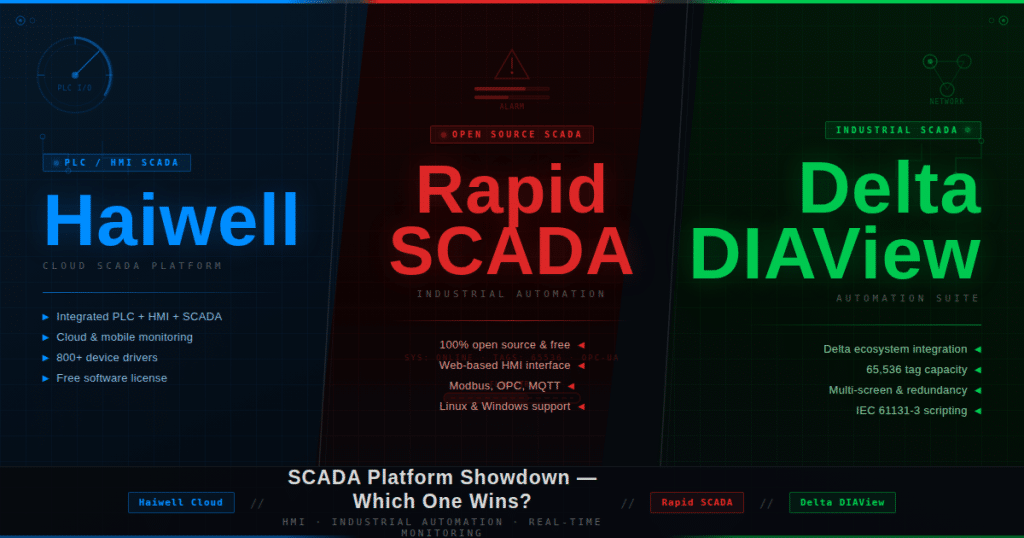
This comparison focuses on three options that appear frequently in engineering discussions when cost is a constraint: Haiwell Cloud SCADA, Rapid SCADA, and Delta DIAView. All three are legitimately free in at least one configuration. All three are actively maintained in 2025. All three can run real industrial monitoring deployments — not just demos.
But they’re free in very different ways, for very different reasons, with very different strings attached.
The Most Important Question First: What Does “Free” Mean for Each?
Haiwell Cloud SCADA — Free, but Hardware-Tied
Haiwell Cloud SCADA is completely free to download and use with no license fee, no tag count limit, and no expiration. The catch: it is primarily designed and optimized to work with Haiwell hardware — Haiwell IIoT HMI panels, Cloud Box gateways, and IoT PLCs. The SCADA connects seamlessly to Haiwell devices; connecting to third-party equipment requires Modbus RTU/TCP or OPC DA/UA, which works but is secondary to the Haiwell ecosystem workflow.
Haiwell’s business model: Earn revenue from hardware sales. The SCADA is free because it drives hardware adoption.
The implication: Haiwell Cloud SCADA is the right choice if you’re already working with Haiwell hardware or evaluating Haiwell for a project. It’s a genuine value-add — SCADA capability at zero marginal cost. As a standalone, hardware-agnostic SCADA for a multi-vendor environment, it’s functional but constrained.
Rapid SCADA — Free and Genuinely Open Source
Rapid SCADA Standard is free, open source (AGPLv3), has no data point limitations, and no expiration date. It runs on Windows and Linux, works with any hardware that speaks standard industrial protocols, and the source code is publicly available. The free tier is a real, deployable industrial SCADA — not a feature-limited demo.
Rapid SCADA’s business model: Sell services (custom development, implementation support, Enterprise edition with additional modules) built on top of the free platform. The software is the marketing.
The implication: Rapid SCADA is the most genuinely hardware-agnostic free SCADA of the three. If you want free SCADA for a mixed multi-vendor environment and are comfortable with configuration-heavy setup, Rapid SCADA is the serious option. The trade-off is that it requires more technical depth to deploy than the vendor-bundled alternatives.
Delta DIAView — Free with Delta Hardware, Licensed Otherwise
Delta DIAView is the SCADA component of Delta Electronics’ automation ecosystem (Delta is a major Taiwanese industrial automation manufacturer). DIAView is provided free of charge when used with Delta PLCs, drives, HMIs, and other automation products. For non-Delta hardware environments or standalone use, licensing applies.
Delta’s business model: Hardware and complete automation solution sales. DIAView free with Delta hardware is the same play as Haiwell — SCADA as hardware incentive.
The implication: Delta DIAView is the right choice if you’re working with Delta PLCs, Delta variable frequency drives, Delta HMIs, or building a complete Delta automation solution. Outside the Delta ecosystem, the value proposition weakens considerably.
Core Feature Comparison
Protocol Support — The Most Practical Consideration
For any SCADA deployment, the protocols supported determine what devices you can connect to. This is where the three tools diverge most clearly.
Haiwell Cloud SCADA:
- Native Haiwell protocol (seamless for all Haiwell hardware)
- Modbus RTU (RS-232/RS-485) — covers most industrial PLCs, inverters, energy meters, instruments
- Modbus TCP — Ethernet-based Modbus
- MQTT — with built-in MQTT broker (unique feature; no external MQTT server required)
- OPC DA/UA — connect to OPC servers from any vendor
- Various built-in device drivers for popular PLC brands
Rapid SCADA:
- Modbus RTU and Modbus TCP
- OPC DA
- SNMP (for network device monitoring)
- HTTP (for web API data sources)
- Database direct (read data from SQL databases)
- Community-developed driver modules extend this list considerably
- Plugin architecture allows adding new drivers
- MQTT via additional modules
Delta DIAView:
- Native Delta protocol (seamless for all Delta hardware)
- Modbus RTU and Modbus TCP
- OPC DA
- Various Delta-specific protocols
- VBScript scripting for custom communication logic
- Standard industrial protocol support is functional but less extensive than Rapid SCADA’s plugin ecosystem
Visualization and HMI Design
Haiwell Cloud SCADA: Windows-only design environment with drag-and-drop canvas; library of industrial primitive graphics (tanks, pipes, pumps, motors, gauges); animation support (element color, visibility, position based on tag values); trend displays; alarm screens; web browser access at runtime (operators can view on any networked browser without client installation). Mobile access through Haiwell Cloud App (iOS and Android). The visualization is functional and production-ready for standard industrial monitoring screens.
Rapid SCADA: Web-based interface using mimic diagrams built from SVG components. The standard visualization is more technical and less graphically polished than commercial alternatives — it prioritizes function over aesthetics. The experimental new mimic diagram engine (released August 2025) improves this. Runs in any browser as the runtime environment (no client installation for operators). The developer community has contributed graphical component libraries that extend the base capability.
Delta DIAView: Windows-based SCADA with WPF (Windows Presentation Foundation) technology for the interface. More polished visualization than Rapid SCADA’s standard interface, with a library of graphics representing Delta’s industrial domain (equipment common in Delta’s target markets: HVAC, factory machinery, energy monitoring). Stand-alone, C/S (client/server), and B/S (browser/server) deployment options. Report wizard for formatted production reports. Video monitoring integration.
Cloud and Remote Access
This is where the three tools differ most dramatically from each other.
Haiwell Cloud SCADA has the most developed cloud story:
- Built-in MQTT server (devices connect directly to the SCADA PC without external broker infrastructure)
- Haiwell Cloud Data Center — Haiwell’s proprietary cloud service; no VPN or port forwarding required for remote access; cloud-enabled Haiwell hardware connects automatically
- Cloud transparent transmission — remote PLC programming, firmware update, and diagnostics over the cloud connection; engineers can push PLC programs and debug remotely without on-site visits
- Haiwell Cloud App for iOS and Android
- No additional infrastructure cost for basic cloud connectivity (uses Haiwell’s cloud servers)
Rapid SCADA runs on servers and in the cloud (Linux compatibility helps here):
- Can be deployed on cloud VMs (AWS, Azure, GCP, on-premises Linux servers)
- Web interface accessible from browsers without client installation
- No proprietary cloud service — you own the infrastructure
- MQTT support via modules
- No proprietary remote management for field devices (Rapid SCADA manages the SCADA layer, not the device firmware)
Delta DIAView:
- B/S (browser/server) version enables web browser access to the SCADA runtime
- No native cloud data center like Haiwell
- Cloud deployment possible on Windows VMs
- Remote access requires standard network infrastructure (VPN or port forwarding) for field access
- No cloud-transparent device management
Scripting and Automation
Haiwell Cloud SCADA: JavaScript scripting — the most widely known language in this group; enables custom calculations, conditional logic, automated workflows, HTTP REST calls for external integrations.
Rapid SCADA: Plugin-based extensibility; custom modules can be developed; configuration-driven automation rather than scripting for standard use cases; the plugin architecture allows integrators to add Python, C#, or other language logic through custom drivers.
Delta DIAView: VBScript — Microsoft’s traditional scripting language for automation; familiar to Windows engineers from the 1990s–2000s era; functional but less current than JavaScript or Python; allows logic implementation for custom calculations and workflow automation.
Database and Historian
Haiwell Cloud SCADA: MySQL and Microsoft SQL Server integration via integrated data-link tool; real-time and historical logging to the database; trend displays query the database for historical visualization; reports exportable to CSV/Excel.
Rapid SCADA: Strong database integration — supports Oracle, Microsoft SQL Server, PostgreSQL, MySQL; this is one of Rapid SCADA’s strengths, particularly for large distributed systems where SQL-based historical analysis is a primary requirement.
Delta DIAView: History logs and database integration; user-defined reports via Smart Report Wizard; designed to pair with Delta’s energy management and production monitoring workflows; recipe management for batch process applications.
Alarm Management
All three support alarm management with configurable conditions, alarm history logging, and operator acknowledgment.
Haiwell Cloud SCADA uniquely offers alarm notifications via WeChat, SMS, and email in addition to on-screen display. The WeChat integration is particularly relevant for Chinese deployments and for teams using WeChat as a primary communication platform.
Rapid SCADA offers email and SMS notification through plugin modules.
Delta DIAView supports alarm notification through email and other standard channels; configurable alarm priority and routing.
Platform and Deployment
| Factor | Haiwell Cloud SCADA | Rapid SCADA | Delta DIAView |
|---|---|---|---|
| OS (Development) | Windows | Windows, Linux | Windows |
| OS (Runtime/Server) | Windows | Windows + Linux | Windows |
| Raspberry Pi | ❌ | ✅ | ❌ |
| Web browser runtime | ✅ | ✅ | ✅ (B/S version) |
| Mobile app | ✅ iOS + Android | ❌ native (browser-based) | ❌ native |
| Cloud service (proprietary) | ✅ Haiwell Cloud | ❌ (self-hosted) | ❌ |
| Open source | ❌ | ✅ AGPLv3 | ❌ |
| Linux server deployment | ❌ | ✅ | ❌ |
| Tag/data point limits (free) | Unlimited | Unlimited | Varies by license |
Who Each Tool Is Built For
Haiwell Cloud SCADA is for:
OEM machine builders using Haiwell hardware. If you’re shipping 50 machines per year each with a Haiwell HMI panel, Haiwell Cloud SCADA adds SCADA capability to every machine at zero marginal cost. Cloud transparent transmission lets you update PLC firmware and debug code remotely across your entire installed base — a significant operational advantage for OEM after-sales service.
Small to medium manufacturing sites deploying Haiwell PLCs. The JavaScript scripting, MQTT built-in broker, and cloud access through Haiwell’s own infrastructure make this a functional, low-configuration cloud SCADA for a plant that has committed to Haiwell hardware.
Teams with mobile-first workflows. The native iOS and Android app and WeChat alarm notifications reflect Haiwell’s primary market — Chinese manufacturing environments where these communication channels are standard.
Engineers who want cloud connectivity without infrastructure overhead. No MQTT server to maintain, no VPN to configure — Haiwell Cloud handles the cloud layer. For a small facility without IT staff, this reduces deployment complexity significantly.
Rapid SCADA is for:
System integrators building multi-vendor solutions. When the site has PLCs from three manufacturers, instruments from two more, and energy meters from a fourth, Rapid SCADA’s hardware-agnostic approach and plugin protocol ecosystem handle the diversity. No hardware lock-in, no vendor preference.
Large distributed systems (power, water, utilities). Rapid SCADA was designed for large-scale distributed monitoring — power systems, water treatment networks, infrastructure spanning multiple sites. Its Linux compatibility, SQL database integration, and open architecture scale to these demands better than hardware-bundled alternatives.
Organizations that prioritize open source. Auditability, no vendor dependency, community development, the ability to fork and customize — Rapid SCADA’s AGPLv3 license provides all of this. For government, critical infrastructure, and organizations with software supply chain policies, open source matters.
Engineers comfortable with configuration-heavy setup. Rapid SCADA rewards technical depth. The initial setup is more involved than the vendor-bundled tools, but the result is a more flexible, less locked-in system.
Linux server environments. If your server infrastructure is Linux (as is common in cloud deployments and embedded systems), Rapid SCADA is the only option of the three that runs natively.
Delta DIAView is for:
Delta automation ecosystem deployments. If the project uses Delta PLCs (DVP, AS, AH series), Delta variable frequency drives, Delta HMIs, or Delta power meters — DIAView is the natural SCADA layer. The integration is native and tight. No protocol mapping required. The complete Delta solution is optimized end-to-end.
HVAC, energy management, and building automation projects. Delta has deep market presence in these sectors, and DIAView’s feature set (energy management reports, HVAC templates, building system graphics) reflects this. The Smart Report Wizard and recipe management are particularly useful for these application types.
Taiwan, Southeast Asia, and markets with strong Delta distribution. Delta’s industrial automation presence is strongest in certain regional markets. Where Delta PLCs are the de facto standard for a local systems integrator community, DIAView is the expected SCADA tool.
The Decision Matrix
| Scenario | Best Choice |
|---|---|
| Building with Haiwell PLCs and HMIs | ✅ Haiwell Cloud SCADA |
| Building with Delta PLCs and automation | ✅ Delta DIAView |
| Multi-vendor mixed hardware environment | ✅ Rapid SCADA |
| Need Linux server deployment | ✅ Rapid SCADA |
| Large distributed infrastructure (power, water) | ✅ Rapid SCADA |
| Need proprietary cloud access without VPN | ✅ Haiwell Cloud SCADA |
| Need remote PLC programming over cloud | ✅ Haiwell Cloud SCADA |
| Need open-source license (auditable, forkable) | ✅ Rapid SCADA |
| Need WeChat / mobile alarm notifications | ✅ Haiwell Cloud SCADA |
| HVAC / building energy management | ✅ Delta DIAView |
| OEM machine builder at scale | ✅ Haiwell Cloud SCADA |
| Academic / educational lab | ✅ Rapid SCADA |
| No IT staff, minimal infrastructure | ✅ Haiwell Cloud SCADA |
The Honest Limitations
Haiwell Cloud SCADA limitations:
- Windows only (no Linux server deployment)
- Optimized for Haiwell hardware — third-party connections via Modbus/OPC work but are secondary
- Proprietary cloud platform — your remote access depends on Haiwell’s cloud service availability
- Community smaller than Rapid SCADA’s outside China
- Primary documentation in Chinese and English; support response may be slower for non-Chinese markets
Rapid SCADA limitations:
- Steeper initial configuration curve — more technical setup than drag-and-drop alternatives
- Visualization less polished than commercial tools without community component libraries
- No native mobile app (browser-based access works on mobile but isn’t optimized)
- Enterprise features (additional modules) are paid add-ons
- Smaller commercial support ecosystem than vendor-bundled tools
Delta DIAView limitations:
- Free only with Delta hardware — this is a significant constraint if Delta isn’t your PLC choice
- Windows only
- Less active open development than Rapid SCADA
- Protocol coverage narrower than Rapid SCADA outside the Delta ecosystem
- VBScript for logic — less modern than JavaScript or Python
The Bigger Context: When Do Any of These Make Sense?
Free SCADA makes sense when:
- Tag counts are low to moderate (hundreds to low thousands)
- IT staff for supporting commercial SCADA licenses isn’t available or isn’t justified
- The project is tied to specific hardware already chosen (Haiwell or Delta cases)
- Budget genuinely constrains commercial SCADA options ($15,000+ for Ignition, $10,000+ for WinCC)
- The organization is comfortable accepting limitations on vendor support
Free SCADA does NOT make sense when:
- Mission-critical infrastructure requires guaranteed vendor SLAs
- Regulatory compliance demands certified, vendor-supported software
- The system will grow beyond thousands of tags and dozens of concurrent clients
- Deep integration with enterprise MES/ERP systems is required from day one
For organizations in that latter category, Ignition (Inductive Automation) is the most recommended upgrade path — its unlimited tag licensing model scales where these free options plateau.
Summary
Haiwell Cloud SCADA wins when you’re in the Haiwell hardware ecosystem and want cloud connectivity, remote device management, mobile access, and zero software cost in a package that requires minimal infrastructure to deploy. Its built-in MQTT broker and Haiwell Cloud transparent transmission are genuinely unique at any price point.
Rapid SCADA wins when you need hardware-agnostic, open-source SCADA for a multi-vendor or large distributed environment, particularly when Linux server deployment or open-source licensing matters. It’s the most flexible of the three, at the cost of higher setup complexity.
Delta DIAView wins when the project is built on Delta’s automation ecosystem — PLCs, drives, HMIs, and meters. The native integration and energy management features make it the natural choice for complete Delta deployments, particularly in HVAC and industrial energy management.
All three are production-deployable. All three are actively maintained. None is the universal answer — but one of them is probably the right answer for your specific situation.
Also see: Haiwell Cloud SCADA — Complete Feature Guide | Delta DIAView SCADA 4.3 — Complete Feature Guide | When Does Free SCADA Make Sense? — A Practical Guide