What Is Fluke TruTest?
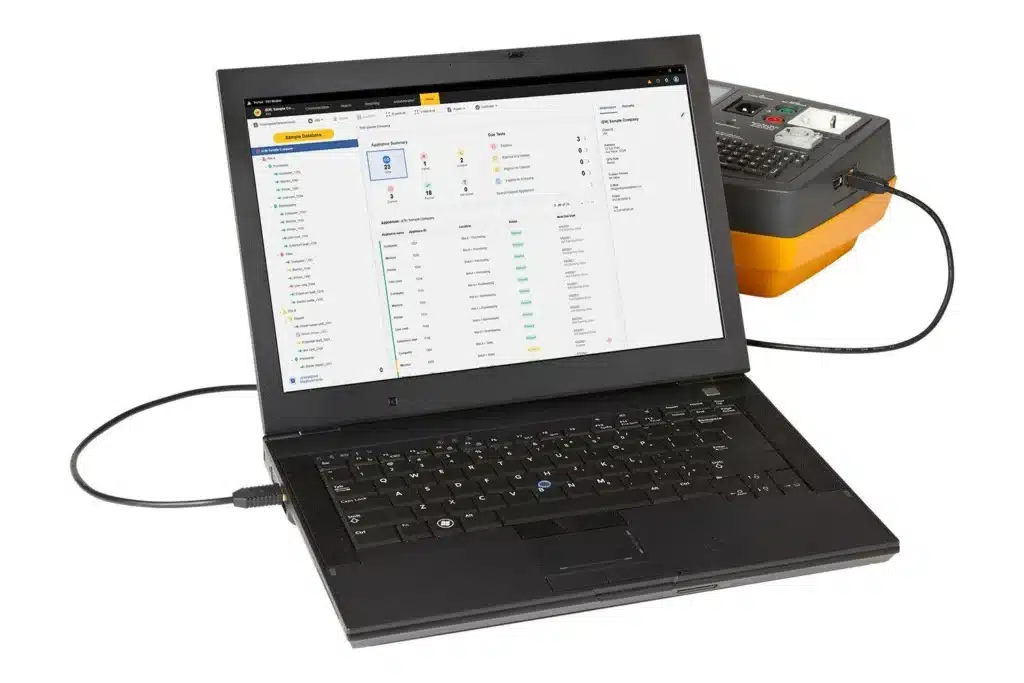
Fluke TruTest is Fluke’s dedicated data management and reporting software for electrical test and measurement professionals. It provides a centralized platform for importing test results from Fluke and Beha-Amprobe instruments, organizing client and site data in a structured database, and generating professional test certificates and compliance reports — all within a single application.
TruTest was designed to replace the manual, paper-based workflows that electrical contractors, PAT testers, and installation engineers traditionally used after completing field testing. Instead of transcribing readings from instrument screens into spreadsheets or word-processed reports, TruTest allows direct data import from the test instrument to the PC, automatic organization into the client/site structure, and one-click report generation.
Version 1.1.0.243 is among the current builds of TruTest, available in both Lite and Advanced editions.
TruTest is used across several distinct electrical testing disciplines:
- Portable Appliance Testing (PAT) — testing electrical appliances for user safety
- Fixed Wire Installation Testing — periodic inspection and testing of electrical installations per IEE Wiring Regulations / BS 7671
- Solar PV System Testing — commissioning and inspection testing per IEC 62446-1
- Workshop Repairs — documenting test results after electrical repair work
- Annual Inspections — maintaining documented records of recurring inspection programs
Compatible Instruments
TruTest is designed to work with a growing list of Fluke and Beha-Amprobe test instruments:
PAT Testers
- Fluke 6500-2 — downloadable portable appliance tester with QWERTY keyboard, built-in memory for test results
- Beha-Amprobe GT-600, GT-650, GT-800 — PAT testing instruments in the Beha-Amprobe range
Multifunction Installation Testers
- Fluke 1662 — multifunction installation tester for basic installation testing
- Fluke 1663 — advanced multifunction tester with EV charging station RCD type B testing capability
- Fluke 1664 FC, 1665 — higher-specification installation testers
- Additional Fluke installation tester models (growing compatibility list)
Solar PV Tester
- Fluke SMFT-1000 — Multifunction PV Tester and Performance Analyzer
- I-V curve analysis for panel efficiency measurement
- Category 1 test regime per IEC 62446-1 for solar safety testing
- TruTest imports SMFT-1000 data for solar installation commissioning reports
Database Migration
Existing databases from Fluke DMS (predecessor software) and Beha-Amprobe ES Control software can be converted and imported into TruTest. Microsoft Access Runtime 2016 is required for the conversion process.
TruTest Editions: Lite vs Advanced
TruTest is available in two license tiers:
TruTest Lite
The entry-level edition bundled with some Fluke instruments:
- Basic data import from compatible instruments
- Limited number of clients, sites, locations, and appliances
- Standard report templates
- Basic user management
- Company logo on reports (limited)
- Suitable for sole traders or very small operations with minimal client volume
TruTest Advanced (TRUTEST-ADV)
The full professional edition — the version of choice for any active PAT testing or installation testing business:
- Unlimited clients, sites, locations, and appliances across all module types
- Unlimited users per workstation
- Both company logo and certification logo editable on reports
- Custom Auto Test codes — create, edit, copy, delete, and print customized test procedure codes
- File and attachment support for remarks in reports
- Report language changeable per client requirement
- Full regional compliance report templates
- 5 years of free software updates from date of purchase
- Solar PV testing module (SMFT-1000 support)
For any professional electrical contractor or PAT testing business running more than a handful of clients, TruTest Advanced is the practical requirement. The Lite edition’s restrictions on client numbers quickly become limiting in real-world use.
Core Features
Hierarchical Client/Site Database
TruTest organizes all test data using a tree topology with four levels:
Client
  └── Site
        └── Location
              └── Appliance / Circuit
This hierarchy mirrors the real-world structure of a testing business:
- A Client is the customer (e.g., “ABC Office Ltd”)
- A Site is a physical address belonging to that client (e.g., “Head Office — 123 Main Street”)
- A Location is a room, floor, or area within the site (e.g., “Second Floor Meeting Rooms”)
- An Appliance is an individual item of electrical equipment at that location
For installation testing, the hierarchy adapts to circuits, distribution boards, and consumer units rather than individual appliances.
Tree nodes can be added, deleted, duplicated, or edited at any level. Entire subtrees (e.g., an entire site with all its locations and appliances) can be duplicated — useful when setting up a new client whose site structure mirrors an existing one.
Direct Instrument Data Import
The most time-saving feature of TruTest — import test results directly from the connected instrument:
- Connect the Fluke instrument to the PC via USB cable
- TruTest detects the instrument automatically
- Results stored in the instrument’s memory download to the corresponding assets in the TruTest database
- No manual data re-entry — the values, pass/fail results, and timestamps from the instrument appear directly in the database
For instruments without direct USB download (older models), manual data entry is also supported — useful for incorporating results from non-compatible instruments into a unified client record.
Auto Test Codes
Auto Test codes are pre-configured test procedures that define exactly what measurements should be collected at a particular type of asset:
- Pre-defined Auto Test codes covering standard test sequences (e.g., Class I appliance test, Class II appliance test, fixed wire continuity test)
- Custom Auto Test codes (Advanced edition) — create bespoke test sequences for specific client requirements or regulatory frameworks
- Auto Tests can be assigned to appliances or circuits before the field visit — the technician’s instrument knows exactly which tests to perform at each asset
- Ensures consistent, complete data collection — no missed tests or forgotten measurements
Live Dashboard
The TruTest dashboard provides an at-a-glance overview of the entire client portfolio:
- All clients listed with their current test status (pass, fail, overdue, upcoming)
- Color-coded status indicators — immediately identify clients with failed items or overdue retests
- Click-through navigation from client level down to individual appliance results
- Especially useful for PAT testing businesses managing regular repeat testing schedules across many clients
Test Certificate and Report Generation
TruTest generates professional, client-ready documentation:
Report formats available:
- International template — general-purpose template suitable for any country
- Regional compliance templates (Advanced edition):
- DIN VDE 0701-0702 — German standard for testing and inspecting repaired electrical equipment
- ÖVE/ÖNORM E 8701 — Austrian standard
- SNR 462638 — Swiss standard
- NEN 3140 — Dutch standard for safety of electrical equipment in use
- IEC 62446-1 — International standard for solar PV system documentation
- EU Directive 2009/104/EC (BetrSichV) — European Workplace Equipment Directive
All regional templates are pre-configured — generating a compliant report for any of these frameworks requires a single button click, not manual formatting.
Report content:
- Client and site information automatically populated from the database
- All test results with measured values and pass/fail outcomes
- Company logo and certification logo (Advanced edition)
- Electronic signature field
- Free-text remarks field with optional file attachments (Advanced edition)
- Professional formatting suitable for direct presentation to clients
Output formats: PDF and print
Solar PV Testing Module
TruTest Advanced supports the Fluke SMFT-1000 solar PV tester, addressing the growing market for solar installation commissioning documentation:
- Import I-V curve data and performance analysis results from SMFT-1000
- Import safety test results from the Category 1 test regime (IEC 62446-1)
- Compare current measurements against previous inspection data to track panel degradation
- Generate IEC 62446-1 compliant commissioning and inspection reports
- Provide clients with visual reports showing panel performance data
Installation and Setup
System Requirements
| Component | Requirement |
|---|---|
| OS | Windows 10, Windows 11 (64-bit) |
| RAM | 4 GB minimum |
| Storage | 2 GB free space |
| USB | Required for instrument connection |
| .NET | .NET Framework 4.6.2 or later |
| Display | 1366 × 768 minimum |
Installation Steps
- Download TruTest from the Fluke TruTest Software Download page (free demo available, or full version with license code)
- Run the installer as Administrator
- Follow the installation wizard
- On first launch, enter your License Code to activate the edition purchased (Lite codes bundled with instruments; Advanced codes purchased separately as TRUTEST-ADV)
License Activation
TruTest uses an online license activation system:
- Enter the license code when prompted on first launch
- The software connects to Fluke’s activation servers to validate and register the license
- Once activated, TruTest can run offline for normal operation
- The Advanced edition license includes 5 years of free software updates — updates download automatically when available
Connecting an Instrument
- Connect the Fluke instrument to the PC via USB cable
- In TruTest, navigate to the appropriate client/site/location in the tree
- Use the Import function to detect and download data from the instrument
- Review imported data and assign to correct assets if needed
Workflow Example: PAT Testing with Fluke 6500-2 + TruTest
Before the site visit:
- In TruTest, set up or open the client record
- Create the site, locations (rooms), and appliance list
- Assign Auto Test codes to each appliance class (Class I, Class II, extension leads, etc.)
- Upload the appliance list to the Fluke 6500-2 instrument
During the site visit:
- The 6500-2 displays the pre-loaded appliance list in order
- For each appliance: scan or enter the asset ID, run the Auto Test sequence
- The instrument records all measured values and automatic pass/fail determinations
- Work through all locations systematically
After the site visit:
- Return to office, connect 6500-2 to PC via USB
- TruTest imports all results automatically — matched to the correct appliances
- Review results on the TruTest dashboard — any failures highlighted in red
- Generate PDF test certificate for the client in the appropriate regional format
- Email or print the certificate
Total time from instrument connection to finished client certificate: typically 5–15 minutes for a standard office PAT test.
TruTest vs. Competing Electrical Testing Software
| Feature | Fluke TruTest Advanced | Seaward PATGuard 3 | Megger PATtrack | Kewtech PAT-Link Pro |
|---|---|---|---|---|
| Compatible hardware | Fluke / Beha-Amprobe | Seaward instruments | Megger instruments | Kewtech instruments |
| PAT testing | ✅ | ✅ | ✅ | ✅ |
| Fixed wire installation | ✅ | Limited | ✅ | ✅ |
| Solar PV (IEC 62446) | ✅ SMFT-1000 | ❌ | ❌ | ❌ |
| Regional report templates | ✅ Multi-country | UK/Ireland focus | UK focus | UK focus |
| Unlimited clients | ✅ Advanced | ✅ | ✅ | ✅ |
| Custom Auto Test codes | ✅ | ✅ | ✅ | ✅ |
| Dashboard overview | ✅ Live | ✅ | ✅ | ✅ |
| 5-year free updates | ✅ | Annual subscription | Annual subscription | Annual subscription |
| Perpetual license option | ✅ | ❌ | ❌ | ❌ |
TruTest’s key advantages: Multi-discipline coverage (PAT + fixed wire + solar PV) in a single platform. Strong international/multi-country report template library — particularly useful for contractors working across different European regulatory frameworks. The 5-year free update inclusion with the Advanced license is a meaningful cost advantage vs. annual subscription models.
When competitor software is preferred: If your entire hardware fleet is Seaward or Megger instruments, their native software (PATGuard 3, PATtrack) will provide deeper integration with those specific instruments than TruTest.
Frequently Asked Questions
Is there a free version of TruTest? Yes. A free demo version is available for download from Fluke’s website. The demo allows you to evaluate the interface and workflow but has limited functionality. The Lite edition is bundled with some Fluke instrument kits.
Can TruTest handle both PAT and installation testing in the same database? Yes. TruTest supports multiple testing disciplines — PAT, fixed wire installation, and solar PV — within the same application and database. A single client record can contain both appliance test results and installation test records from the same or different sites.
What happens after the 5 years of free updates in the Advanced edition? After the 5-year update period, TruTest continues to work with the last version installed — it does not expire or stop functioning. Purchasing a new license or update subscription would be required to receive software updates beyond the 5-year period.
Can I migrate data from Fluke DMS (the older Fluke software)? Yes. TruTest includes a conversion tool that migrates databases from the older Fluke DMS software and Beha-Amprobe ES Control. Microsoft Access Runtime 2016 must be installed on the PC to run the conversion.
Does TruTest work on a network with shared data? TruTest is primarily a single-PC application. For multi-technician teams needing shared access to the same client database from multiple computers, a network-shared folder can be configured as the database location, though this is not an officially supported multi-user architecture. For larger organizations requiring genuine multi-user database access, cloud-based PAT testing software platforms may be more appropriate.
How many instruments can be connected to one TruTest installation? There is no stated limit on the number of different instruments that can be connected to one TruTest PC over time. Each compatible instrument can transfer data to the same TruTest database.
Summary
Fluke TruTest is the essential PC companion for electrical testing professionals using Fluke or Beha-Amprobe instruments. It transforms raw instrument data into organized client records and professional compliance certificates — eliminating the manual paperwork burden that has traditionally followed field electrical testing.
The Advanced edition’s combination of unlimited assets, multiple regional compliance report templates, solar PV testing support, and 5 years of free updates makes it a compelling value proposition for professional PAT testers and electrical contractors working in the UK, Europe, and internationally.
For licensing assistance or TruTest setup support, contact our team via Telegram: t.me/DoCrackMe
Related articles: Fluke 6500-2 PAT Tester Setup Guide — From Commissioning to First Test | IEC 62446-1 Solar PV Commissioning Documentation with TruTest and SMFT-1000 | PAT Testing Software Comparison 2026 — TruTest vs PATGuard 3 vs PATtrack