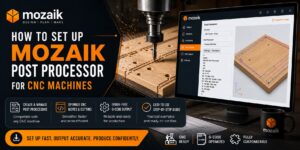
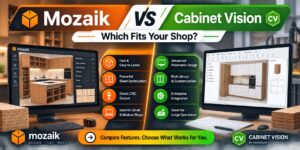
Introduction: why software choice decides shop profitability
In cabinetmaking and wood furniture manufacturing, the gap between a good-looking design and an accurately cut, low-waste part is filled by software. A shop that still draws in general-purpose CAD and writes cut lists by hand in a spreadsheet typically runs several percentage points more material waste, more human error and longer lead times than competitors. Shops running an integrated design-to-manufacture package handle 3D design, part calculation, sheet optimization and machine code generation inside a single environment.
This article reviews four professional packages that share one decisive capability: simultaneous 2D and 3D design combined with direct CNC output, with no separate CAM seat required. That combination is exactly what a shop with a nesting router or a point-to-point machine needs. Alongside the reviews you will find selection criteria, a comparison table, practical notes on post processor setup, and a FAQ, so you can match a package to your shop size, machine list and budget.
How to evaluate cabinet design and cutting software
Before comparing products, it helps to understand what separates a dedicated cabinet package from general CAD. The criteria below are the ones that decide whether a software investment pays back.
1. Parametric design and part intelligence
In general CAD, changing a cabinet width means manually editing every panel, dado, hardware bore and shelf position. In a dedicated parametric package, you change one number and the entire structure — carcass, doors, drawers, slides, boring patterns — recalculates automatically. On custom work, this difference saves hours per project.
2. Live 2D and 3D from a single model
2D views are needed for shop drawings, plans, elevations and dimensioning; 3D is needed for client presentation and clash checking. Good software generates both from one model, rather than forcing you to maintain a drawing and a model separately.
3. Cut optimization and true shape nesting
The optimization module arranges parts on standard sheet sizes to minimize offcut waste. The more advanced form is true shape nesting, which fits non-rectangular parts such as arched doors and curved components into the gaps between other parts. With sheet goods pricing as volatile as it has been, a few percentage points of waste reduction flows straight to margin.
4. Direct output and post processors
This is the critical criterion. The software should produce ready-to-run machine code, not just a flat DXF outline. Real machine code carries tool selection, cut depths, hardware boring, back panel grooves and second-side operations. Post processor quality is the difference between a one-day commissioning and a month of trial and error.
5. Hardware and material libraries
Support for common brands such as Blum, Hettich, Grass and Salice, plus the ability to add locally available hardware and sheet goods, determines how realistic your output is. If you have to define every hinge from scratch, much of the software’s advantage disappears.
6. Reporting, quoting and labelling
Cut lists, hardware lists, cost estimates, quotes and part labels are what turn design output into a management tool. Label printing for nested parts matters especially in shops running several jobs through the machine at once.
1. Mozaik — the strongest fit for small and mid-size CNC shops
Mozaik, from Mozaik Software, is one of the fastest-growing design-to-manufacture platforms in the cabinet industry, built specifically for shops that own a nesting router or are about to buy one. Its core strength is chain coverage: floor plan, 3D view, cabinet editing, cut list, labels and machine code all happen in one Windows program, so you are not buying a CAD seat plus a separate CAM seat.
2D and 3D design environment
Work in Mozaik starts by drawing the room plan and walls, then dragging cabinets from configurable Frameless, Face Frame and Wardrobe libraries. Every change to the plan is reflected immediately in the live 3D view and the reverse. During a single client meeting you can change counter height, cabinet depth, door style and material colour and show the result in real time. Shop drawings — plans, elevations, sections and details — are generated automatically from the same model.
Parametric engine and editable libraries
Mozaik’s structure is fully parametric. You define your shop’s construction method once — panel thickness, joinery type, edge banding allowance, 32 mm boring system, door reveal and other standards — and every cabinet you draw from then on is built to that method. This means output matches how your shop actually builds, not a vendor default.
True shape nesting and G-code generation
Mozaik CNC is the core of the product’s appeal. It handles true shape nesting, automatic hardware boring, second-side operations (flipside) and instant machine code generation. One practical and often overlooked feature is the automatic squaring cut, which ensures parts reference correctly against the machine’s alignment pins when the sheet is flipped. If your router has no reference pins, the built-in alignment system works on any flat table machine the software posts to.
All stock post processors are supplied to customers at no extra charge, and post files are open text files, meaning you or your machinery supplier can modify them as needed. The list of supported CNC brands is unusually broad and is arguably the single strongest differentiator against competitors. Post integration is handled online with a technician, with the first hour provided free. The NBM labelling module lets you design custom label templates and print sheet or roll-fed labels for nested parts automatically.
Editions and pricing
Mozaik ships in two main product lines. Mozaik Manufacturing targets shops without a CNC router and covers design, 3D rendering, cut lists, hardware lists, the optimizer and pricing reports. Mozaik CNC adds nesting, G-code generation and post processors on top. The commercial model is subscription-based, with additional seats billed monthly per user, and cloud rendering priced separately per company rather than per seat. Note that the software is Windows-only, with no native macOS build.
Strengths and limitations
Strengths: gentler learning curve than the heavyweight alternatives, full design-to-production coverage in one program, very broad CNC controller support, open and editable post files, lower entry cost for small and mid-size shops.
Limitations: Windows dependency, a subscription model with cumulative long-term cost, and same-location restrictions on additional seats that are worth clarifying before purchase if your design office is separate from your shop floor.
If this section suggests Mozaik is the right fit for your shop, you can review the current release, installation guidance and licensing options on the Mozaik license and download page, which covers current version capabilities, machine compatibility and activation steps in detail.
2. Cabinet Vision — the industry standard for larger production lines
Cabinet Vision, developed by Hexagon, is the most widely used design-for-manufacturing software in the cabinet and casegoods industry. It covers custom cabinet and room design, photorealistic rendering, material optimization, bidding and costing, and cut list and bill of materials generation.
The S2M Center module
Cabinet Vision’s real power comes from pairing it with S2M Center — Screen-To-Machine. This module automatically processes part geometry and machining data and produces machine-ready G-code for flat table routers, point-to-point machines, panel saws, drill and dowel machines, chop saws and other specialized woodworking machinery. One of its key features is linked part outlines, which builds a more efficient toolpath and can meaningfully reduce CNC cycle times.
S2M Center is offered at several levels so shops can match capability to production complexity, with add-ons for true shape nesting and labelling. DXF import gives flexibility to bring in work from other CAD applications. The ability to simulate machining operations before sending them to the machine is a valuable safeguard on expensive sheet stock.
Who it suits
Cabinet Vision is the logical choice for mid-size to large manufacturers, office furniture producers and companies running several different CNC machines that need workflow management between them. For a three to five person shop, the license cost and the time required to fully configure catalogs and standards will likely exceed the need. The learning curve is steeper than Mozaik’s and formal training is usually necessary.
3. SWOOD — SOLIDWORKS power for complex woodworking projects
SWOOD, from French developer EFICAD, takes a different approach: rather than building a dedicated CAD environment, it embeds itself entirely inside SOLIDWORKS. The result combines SOLIDWORKS parametric 3D modelling with woodworking-specific tooling.
SWOOD Design and SWOOD CAM
SWOOD Design handles furniture and cabinet design in a parametric 3D environment, with ready-made customizable libraries, multi-material management, drag-and-drop intelligent hardware components and a layout mode for late-stage changes. Data exports — cut lists, hardware lists, program lists with label information, bills of material and panel saw export — are generated automatically.
SWOOD CAM converts the design into machine programs. It supports 3-axis and 5-axis machines, routers, drills, edgebanders and nesting panel saws, and manages practical shop-floor details including suction cup control, bars, clamps, edgebanding units and drilling blocks. Critically for woodworking, SWOOD addresses domain-specific concerns such as grain direction and edge banding — things that metalworking CAM packages simply do not model.
Who it suits
SWOOD is the best option for companies doing complex, non-standard work: bespoke interior fit-out, designed furniture, curved wooden structures, or projects requiring complex surface modelling. If your team already works in SOLIDWORKS, ramp-up time drops sharply. Against that, it requires a SOLIDWORKS license, which raises total cost of ownership, and it is over-specified for a shop producing standard kitchen cabinets.
4. PolyBoard — the economical, flexible option for smaller shops
PolyBoard, from Boole & Partners and sold under the Wood Designer brand, is built on a method-driven parametric concept. The user defines arborescent cabinet structures with dynamic material styles and manufacturing methods, and the software redraws the design in 2D and 3D while recalculating cutting lists and toolings in real time.
Key capabilities
PolyBoard’s geometric engine handles cabinetry of unusual shape: sloping sides, tops that slope in more than one direction, fitting along walls at awkward angles, and building around pipework or columns. Cut lists convert into sequential cutting maps or full-shape nesting with grain matching, then export to most CNC machines. A customizable quote module plus cost, material and hardware reports complete the workflow.
PolyBoard is typically used alongside two companion tools from the same family: OptiCut for linear cut optimization and OptiNest for free-form shape nesting. StairDesigner, also in the range, handles balanced, geometric and winding staircases and exports production-ready DXF files.
A different pricing model
Unlike Mozaik’s subscription, PolyBoard is sold as a perpetual license across several editions at different price points, with the professional editions carrying full point-to-point and CNC output. For shops that prefer to pay once rather than commit to a monthly cost, this is attractive. The vendor also allows free use of the design side with manufacturing output purchased on a per-project basis, which is a low-risk route for shops just starting out.
Quick comparison of the four packages
| Feature | Mozaik | Cabinet Vision | SWOOD | PolyBoard |
|---|---|---|---|---|
| 2D and 3D design | Yes, dedicated environment | Yes, with photoreal rendering | Yes, inside SOLIDWORKS | Yes, method-driven |
| Direct CNC output | Mozaik CNC | S2M Center | SWOOD CAM | Pro and Pro PP editions |
| True shape nesting | Built in | S2M add-on | Built in | Via OptiNest |
| Licensing model | Monthly subscription | License plus support contract | License plus SOLIDWORKS | Perpetual license |
| Learning curve | Gentle | Steep | Moderate to steep | Moderate |
| Best suited to | Small and mid-size CNC shops | Factories and large production lines | Complex, bespoke projects | Small shops on a tight budget |
Which package fits your shop?
Scenario one: a two to ten person shop with one nesting router
This is the most common situation. A shop building custom kitchens, wardrobes and counters with a single nesting CNC gets the most out of Mozaik, because the whole chain runs in one program, entry cost is low, and post processor commissioning is handled with vendor support. PolyBoard is the economical alternative in this bracket, particularly if you prefer a perpetual license.
Scenario two: a factory with multiple machines and volume production
When the line includes a panel saw, a point-to-point, a drill and dowel machine and an edgebander running simultaneously, and dozens of jobs are processed daily, workflow management between machines becomes the deciding factor. Cabinet Vision with S2M Center is the more standard choice here, though you should budget time and money for training and initial configuration.
Scenario three: complex interior architecture work
If your work leans towards non-standard wooden structures, curved surfaces, wall panelling and bespoke designed furniture, SWOOD’s SOLIDWORKS foundation gives far more freedom. Accept the trade-off: designing a standard kitchen will be slower in that environment than in a dedicated cabinet package.
Practical notes before buying and commissioning
Take the post processor seriously
No package works with your machine automatically. Before purchase, identify the exact machine model, controller type and input file format, and get written confirmation from the vendor that a matching post processor exists or can be configured. Mozaik’s post files being open text is genuinely valuable here, because many machines in the field run modified or third-party controllers.
Dry run before you cut
Run the first production program on scrap stock, or with the tool raised, to verify origin point, axis direction, operation order and cut depths. Most early damage comes from a mismatch between how the software and the machine define sheet zero.
Define construction standards properly from the start
It is tempting to start with defaults, but the time spent precisely defining thicknesses, boring systems, joinery, door reveals and back panel method pays back many times over in the following months. This stage typically takes one to two weeks and is best done with a trainer.
Keep material libraries current
Sheet dimensions available from your suppliers do not always match software defaults. Keep the material library updated with real sheet sizes, thicknesses and current pricing so both nesting and cost estimation stay accurate.
Other options worth reviewing
Although this article focused on four packages, several other solutions are worth knowing. Microvellum runs on AutoCAD and targets large commercial and casegoods projects. imos iX is common in large European factories and integrates with ERP systems. KCD Software and Cabinet Pro serve smaller North American shops. Pro100 is more of a presentation and sales tool than a complete production solution. SketchUp combined with cut list extensions is popular in shops without CNC, but it lacks reliable direct machine output and therefore falls outside the scope of this comparison.
Frequently asked questions
Do I need a CNC machine to use these packages?
No. All four have an edition or configuration that is useful without CNC, producing cut lists, shop drawings and cost estimates. Mozaik Manufacturing, for example, is aimed specifically at shops without a router. That said, most of the value is unlocked when you use direct machine output.
Will these packages work with my existing CNC machine?
In most cases yes. Common machines run recognized controllers and accept standard G-code or DXF. Even so, confirm your controller model and get post processor compatibility verified before buying a license.
Which is fastest to learn?
Mozaik generally has the gentlest learning curve, and an experienced shop user typically reaches production level within a few weeks. PolyBoard comes next. Cabinet Vision and SWOOD require formal training and more time.
Can I design in one package and machine in another?
Technically yes, usually via DXF. But this discards the main advantage — intelligent data transfer. A flat DXF carries no depth, tooling, operation sequence or hardware boring data, so all of it has to be rebuilt manually. Staying inside one integrated chain is strongly recommended.
What is the real total cost of ownership?
Beyond the base price, budget for additional seats, optional modules such as rendering or advanced nesting, post processor commissioning, training and an annual support contract. Subscription products give predictable but continuous annual cost; perpetual licenses cost more up front with no monthly commitment.
Do these run on macOS?
Effectively no. Mozaik is Windows-only, and Cabinet Vision and SWOOD are Windows environments too. Running them on a Mac requires a virtual machine or Boot Camp on compatible hardware, which is not recommended for production work.
What is the lowest-risk way to start?
If you are new to this category, begin with a trial or a base edition, implement your shop’s construction standards in it, and only upgrade to the full CNC edition once you have confirmed that output matches your machine. This route substantially reduces investment risk.
Conclusion
Choosing cabinet design and cutting software is less a software decision than a production decision. The right question is not which package is best, but which package matches your shop size, machine list, project complexity and budget. For most small and mid-size shops running a nesting router and looking for the shortest path from design to cut, Mozaik offers a balanced combination of accessibility, full chain coverage and broad machine support. Larger factories with multi-machine lines will find Cabinet Vision the more standard fit. Companies handling complex interior architecture benefit from SWOOD’s flexibility, and shops on a limited budget who prefer perpetual licensing will find PolyBoard a sensible choice.
In 2026, with sheet goods pricing volatile and competitive pressure on lead times, investing in an integrated design-to-manufacture chain is no longer a luxury. Before you buy, verify your machine model, confirm post processor compatibility, and allow proper time for the construction standards implementation phase.
Get a license — free consultation
Pricing depends on version and number of users. Message us on Telegram and we’ll reply with an exact quote — no commitment required.
|
✓
20+ years experience
Software engineers with a long track record
|
⚡
Delivered within 24h
Your license is sent within one business day
|
↩
Money-back guarantee
If the license doesn’t work, we refund in full
|
Usually reply within a few hours — free consultation, no upfront payment