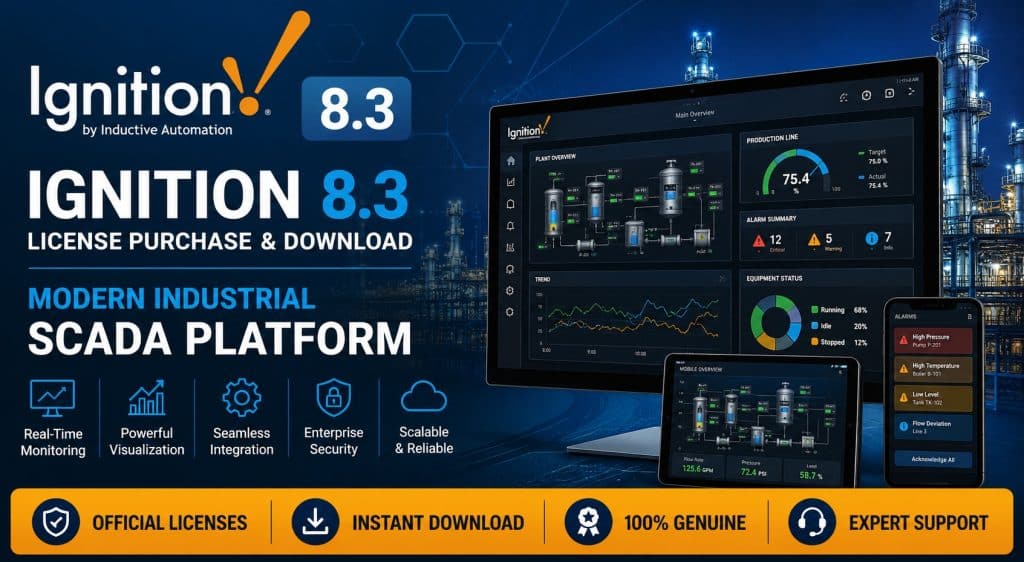
Overview of Ignition 8.3
Ignition is the flagship industrial application platform from Inductive Automation, combining SCADA, HMI, and MES capabilities into a single, server-centric software suite. Version 8.3 represents the most significant architectural overhaul in the platform’s history — a ground-up modernization built for security, scalability, and next-generation industrial application development. Whether you need to download a trial to evaluate the platform or move directly to a full software deployment, understanding what changed in 8.3 is essential before committing to a license.
Unlike traditional client-server SCADA packages, Ignition runs on a central Gateway server, with clients connecting through a browser or a lightweight launcher — no heavyweight desktop installs required on every workstation. This web-launched architecture dramatically reduces deployment time, patching overhead, and the total cost of maintaining a fleet of HMI stations across a plant or an enterprise.
One of the platform’s defining commercial advantages is its licensing model. Where most competing SCADA/MES platforms charge by tag count, client count, or screen count, many of Ignition’s core modules are licensed with unlimited tags, unlimited clients, and unlimited screens. That single decision removes one of the biggest sources of budget uncertainty in large industrial projects, and it’s a major reason system integrators and end users keep choosing Ignition when comparing software platforms for a new build-out.
Core Features and Capabilities
Ignition’s architecture is modular: the Gateway core is lightweight, and specialized modules are layered on top based on project needs. The most important capabilities include:
Web-Based, Cross-Platform Architecture
Built on Java, Ignition runs on Windows, Linux, and containerized environments such as Docker and Kubernetes. This removes any hard dependency on a single operating system and makes the platform a natural fit for organizations running mixed Windows/Linux infrastructure.
Vision and Perspective Visualization Modules
The Vision module builds classic desktop-oriented HMI screens, while Perspective builds fully responsive, mobile-ready interfaces. With Perspective, an operator can monitor and interact with a production line from a tablet, phone, or browser — no client software installation required.
Native Protocol and Device Connectivity
Ignition ships with native OPC-UA server and client capability and supports industrial protocols including Modbus, Ethernet/IP, BACnet, and dedicated drivers for Siemens, Allen-Bradley, and Schneider controllers. This lets integrators connect directly to existing PLCs without additional middleware.
Alarming, Reporting, and Historical Data
The Alarming module supports multi-level alarm configuration with notification via email, SMS, and voice. The Reporting module generates scheduled production, energy, and quality reports, while the historian modules capture process data for trend analysis and continuous improvement.
Python Scripting via Jython
One of Ignition’s strongest differentiators is full customization through Python scripting (via Jython). Automation engineers can implement complex control logic, calculations, and integrations with ERP/MES systems without relying on third-party tools.
IIoT and MQTT Support
With the addition of Cirrus Link modules (MQTT Transmission, Engine, Distributor), Ignition becomes an IIoT-ready platform capable of collecting data from geographically distributed assets — remote pump stations, wellheads, or unmanned sites — over the lightweight MQTT protocol.
Redundancy and High Availability
For operations where downtime is costly, Ignition supports redundant Gateway configurations so a backup server can take over seamlessly if the primary server fails.
💬 Need a license or have questions? → Message us on Telegram — free consultation, usually reply within a few hours.
New Features in the 2026 Ignition 8.3 Release Cycle
Ignition 8.3 is not a routine update — Inductive Automation describes it as a completely modernized platform for building the next generation of industrial applications. Throughout the 2026 release cycle, the following changes have defined this version of the software:
Redesigned Gateway Web Interface
The Gateway configuration web page has been fully rebuilt with integrated search, improved visual organization, and unified configuration/diagnostic tools — eliminating much of the time-consuming navigation between sections that existed in earlier versions.
New Historian Module Suite
One of the most significant changes is the introduction of the Historian Module Suite, made up of the Historian Core Module (featuring the internal QuestDB engine for fast querying, native aggregation, and zero-configuration archiving), the SQL Historian Module for connecting to relational databases, and a Historian API for building custom historian implementations. This restructuring makes historical data storage more scalable and easier to extend.
Event Streams Module
The new Event Streams module creates an event-driven communication pipeline between data sources (tag changes, Kafka topics) and handlers (scripts, database tables). This is especially useful for teams integrating Ignition with data-driven analytics platforms and real-time plant-floor decision systems.
Perspective Module Enhancements
Perspective now includes a native vector Drawing Editor, a form generator, and an offline mode for data entry and storage without a network connection — a meaningful improvement for operators working in areas with unreliable connectivity.
JSON-Based Projects and Git Version Control
Project files have moved from legacy binary formats to JSON, enabling proper change tracking, merging, and full Git-based collaboration — bringing Ignition development workflows much closer to standard DevOps practices.
Multi-Layered Security: Secrets Management
A new Secrets Management system, combined with Google Protobuf for internal communications, significantly strengthens the platform’s security posture against industrial cyber threats — an important consideration for critical infrastructure operators facing stricter compliance requirements.
Built-In REST API and Simplified Containerization
A REST API is now built into the Gateway by default, simplifying automated configuration, DevOps pipeline integration, and multi-gateway management. Running Ignition as a container (Docker/Kubernetes) has also been substantially simplified.
Expanded Drivers and Improved Store-and-Forward
Siemens S7 driver support has been expanded, and the Store-and-Forward mechanism — which temporarily buffers data during network outages and forwards it once connectivity resumes — has been improved for environments with unstable network links.
Typical Industry Use Cases
Because of its flexible architecture and unlimited licensing model, Ignition fits a wide range of industrial applications:
Oil, Gas, and Petrochemical
Monitoring process parameters (pressure, temperature, flow) across refining and processing units, aggregating data from geographically dispersed wellheads via MQTT, and managing HSE safety alarms are common Ignition deployments. Perspective’s offline mode is particularly valuable for data capture at remote platforms and stations.
Steel, Mining, and Heavy Manufacturing
On smelting, rolling, and mineral processing lines, Ignition provides real-time production monitoring, quality management, and native connectivity to existing PLCs (Siemens, Allen-Bradley) without requiring field hardware replacement.
Water and Wastewater Utilities
Utilities use Ignition’s web-based architecture and MQTT-based data distribution to monitor pump stations, treatment plants, and storage reservoirs spread across wide geographic areas — especially where connectivity is limited.
Food, Beverage, and Pharmaceutical
Batch traceability requirements, quality parameter logging, and audit-ready reporting are implemented through the Reporting and Historian modules on food and pharmaceutical production lines.
Power Generation and Energy Management
Energy consumption monitoring, power generation unit efficiency tracking, and integration with energy management systems (EMS) are additional common Ignition applications.
💬 Need a license or have questions? → Message us on Telegram — free consultation, usually reply within a few hours.
Comparison with Similar Software
The global SCADA/MES market has several established players, each with distinct strengths and trade-offs:
Ignition vs. Siemens WinCC
WinCC is often a stronger fit for projects built entirely within the Siemens PLC and network ecosystem, but its licensing is typically tag-based, which sharply increases costs for large deployments. Ignition’s unlimited-tag model and multi-protocol support offer more flexibility in mixed-vendor PLC environments.
Ignition vs. AVEVA System Platform (Wonderware)
System Platform has a powerful architecture for large enterprise projects, but installation and configuration are more complex and rely heavily on desktop clients. Ignition’s web-launched Perspective architecture simplifies access from virtually any device without a heavy client install.
Ignition vs. GE Digital iFIX / Proficy
iFIX has a long track record in discrete manufacturing and some process industries, but add-on module costs and licensing complexity tend to run higher than Ignition’s. Ignition’s Python-based scripting ecosystem is also more attractive to in-house development teams.
Ignition vs. Rockwell FactoryTalk
FactoryTalk is typically optimized for projects built entirely on Allen-Bradley hardware, but licensing is applied per client and per tag. Ignition’s commercial model is specifically designed to lower long-term total cost of ownership (TCO).
Overall, Ignition’s core advantage over its competitors is the combination of a modern web-based architecture, a transparent and unlimited licensing model, and an open scripting ecosystem with third-party modules available through the Ignition Exchange — while traditional competitors are often tied to a specific hardware vendor or a heavier licensing structure.
License Purchase Guide
Sourcing a genuine, valid license for international industrial software can involve payment and regional access challenges depending on where your organization is based. docrack.me is a specialized reseller of industrial and engineering software licenses that simplifies this process for customers, offering streamlined payment options and fast delivery for Ignition and many comparable platforms.
Purchase and Activation Steps
- Identify the modules your project actually needs (Vision, Perspective, Historian, Alarming, and so on) based on real production requirements
- Request a final price quote from the docrack.me support team based on your module combination and license term
- Complete the order and payment through supported payment methods
- Receive the official download package for the Ignition 8.3 installer along with your license activation key
- Install the Gateway, enter the license key, and complete initial project setup with guidance from the support team
Beyond fast license delivery, the docrack.me technical team provides support for correct activation, troubleshooting Gateway connectivity, and guidance on selecting the right modules for your project — valuable for teams working with Ignition’s architecture for the first time.
Before purchasing, it’s worth discussing your project’s exact specifications (number of Gateways needed, tag volume, redundancy requirements, and specialized modules) with the sales team so the right license package can be matched to your budget and technical needs.
💬 Need a license or have questions? → Message us on Telegram — free consultation, usually reply within a few hours.
Frequently Asked Questions
Is Ignition 8.3 compatible with older versions like 8.1?
Yes. Inductive Automation provides migration tools to move 8.1 projects to the new 8.3 structure, though because of architectural changes in the historian modules and project file format, full testing in a staging environment is recommended before migrating a production system.
How much does an Ignition 8.3 license cost?
Final price depends on the combination of modules selected (Vision, Perspective, Historian, Alarming, Reporting, etc.) and the license term. For an accurate quote tailored to your project, contacting the docrack.me sales team is the most reliable way to get pricing.
Can I download a free trial version of Ignition?
Yes, Inductive Automation offers a full-featured trial (fully functional for a limited time) so you can test the platform’s capabilities before committing to a final license purchase.
Is Ignition suitable for sites with unreliable internet connectivity?
Yes. With Store-and-Forward and Perspective’s offline mode in version 8.3, data is temporarily buffered during network outages and automatically forwarded once connectivity is restored.
How does Ignition license activation work?
Activation is completed by entering the license key in the Gateway’s management panel. The docrack.me support team provides guidance through the full installation and activation process.
Can Ignition be installed on Linux servers?
Yes. Because of its Java-based architecture, Ignition can be installed and run on Windows, various Linux distributions, and even as a Docker container.
Why buy an Ignition license through docrack.me?
docrack.me has years of experience supplying licenses for specialized industrial and engineering software, offering a simplified purchase and payment process with fast delivery, plus ongoing support after the sale.
Is Ignition cost-effective for smaller projects too?
Yes. Thanks to Ignition’s modular licensing model, it’s possible to purchase only the modules a project actually needs rather than a full bundle, making it a viable option even for smaller-scale deployments.
Get a license — free consultation
Pricing depends on version and number of users. Message us on Telegram and we’ll reply with an exact quote — no commitment required.
|
✓
20+ years experience
Software engineers with a long track record
|
⚡
Delivered within 24h
Your license is sent within one business day
|
↩
Money-back guarantee
If the license doesn’t work, we refund in full
|
Usually reply within a few hours — free consultation, no upfront payment