
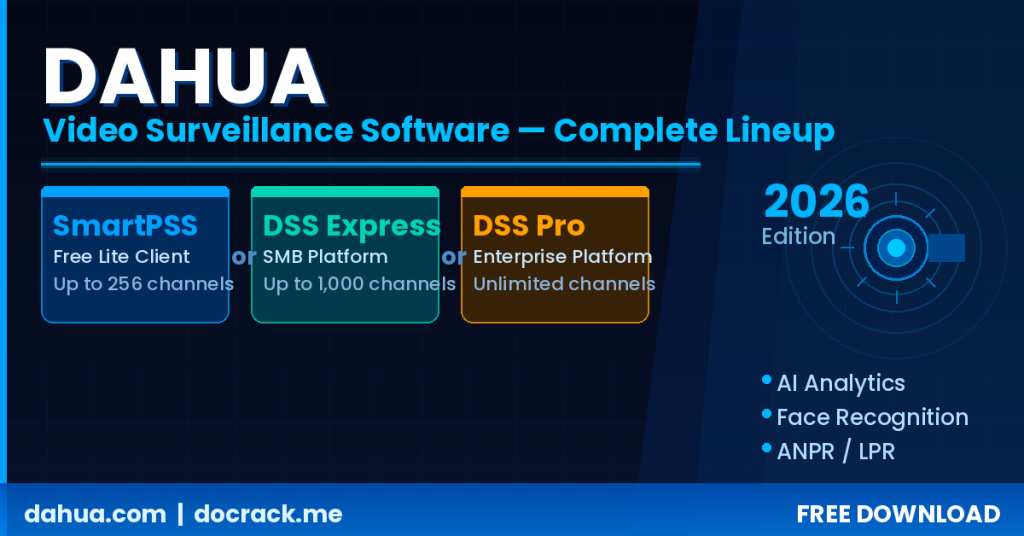
Dahua offers three distinct software platforms for managing IP cameras and video surveillance systems — and their similar-sounding names cause constant confusion. SmartPSS is a free standalone client for homes and small offices. DSS Express is a free client-server VMS designed to replace SmartPSS in small-to-mid projects. DSS Professional is a full enterprise-grade Video Management System that requires licensing. Picking the wrong one means either overpaying or deploying a platform that simply cannot handle your project’s requirements.
This guide breaks down all three in detail and closes with a decision table to help you choose fast.
Quick Overview — Three Software Platforms, Three Different Goals
| Feature | SmartPSS Lite | DSS Express (Free) | DSS Express Plus | DSS Professional |
|---|---|---|---|---|
| Architecture | Standalone | Client-Server | Client-Server | Client-Server (Enterprise) |
| Cost | Free | Free | Paid license | Paid license (mandatory) |
| Max channels (free tier) | ~25 devices | 64 channels | 512 channels | 16 base + add-ons |
| Concurrent users | 1 (local only) | 1 | 100 | Up to 200 |
| Web access | ❌ | Limited | Limited | ✅ Full |
| AI (face recognition, LPR) | Basic | Moderate | Moderate | ✅ Full (AcuPick, text-to-image) |
| Video wall | ❌ | ❌ | ✅ | ✅ |
| Multi-server federation | ❌ | ❌ | ❌ | ✅ (up to 20 child servers) |
| Failover / HA | ❌ | ❌ | ❌ | ✅ |
| Ideal for | Home / small office | SMB / small projects | Mid-size projects | Enterprise / large deployments |
SmartPSS Lite — Simple, Free, No Server Required
What is SmartPSS?
SmartPSS (and its lighter variant SmartPSS Lite) is Dahua’s standalone camera management client. It installs on a single Windows PC and connects directly to cameras and NVRs on your network. There is no background server service — you open the app, connect to your devices, and start monitoring. No server hardware, no always-on service, no complexity.
Dahua has officially stopped active development on SmartPSS and positioned DSS Express as its successor, but SmartPSS remains available through Dahua Toolbox and remains popular for home and small-office use cases.
Who uses SmartPSS?
- Homeowners with 1–3 cameras or a single NVR
- Small shops and offices that only need one monitoring workstation
- Security technicians for quick on-site device configuration and testing
- Anyone who does not want to maintain a permanently running server
SmartPSS Advantages
- Instant setup: Download, install, connect — ready in under 5 minutes
- No server: No dedicated hardware or always-on service required
- Completely free: No license, no subscription, no hidden costs
- Lightweight: Runs on older hardware without issues
- P2P remote access: Connect remotely using device UID without port forwarding
SmartPSS Limitations
- Single-user: Only accessible from the PC where it is installed
- No web interface: No browser-based access
- Development discontinued: No new features are being added
- No role management: No granular user permission system
- No video wall: Not suitable for a control room setup
- Limited AI: No advanced face recognition or AcuPick search
🧮 Check our DSS Pro 8.8 License Price Calculator — find the right plan and get an instant price estimate.
DSS Express — Free Client-Server VMS with More Power
What is DSS Express?
DSS Express is a client-server Video Management System that Dahua introduced as the official SmartPSS replacement. Unlike SmartPSS, DSS Express requires you to install a server service on a permanently running PC, and users then connect to it via the client application. This architecture unlocks multi-user access, centralized recording management, and more advanced alarm handling — even when no client is actively open.
DSS Express comes in two tiers:
- Free edition: 64 video channels, 1 concurrent user
- Plus edition (paid): 512 video channels, 100 concurrent users, expanded features
What DSS Express adds over SmartPSS
The core difference is architecture. Because DSS Express runs a real server process:
- Multiple users can connect simultaneously from different workstations
- Recording, alarms, and device management are centralized — running even when no client is open
- The DSS Mobile app works with full access to live view, playback, and alarms
- Video wall is supported in the Plus edition
- Alarm management is more advanced — acknowledgment, assignment, action plans
Important limitations of the Free edition
- Only 1 concurrent user — effectively the same constraint as SmartPSS but with heavier infrastructure overhead
- Supports only 8 ONVIF channels (for non-Dahua cameras)
- No server-side scheduled recording (recording stays on the NVR only)
- No offline license activation support
Is DSS Express Plus worth it?
The Plus license adds:
- 512 video channels (up from 64)
- 100 concurrent users (up from 1)
- Server-side scheduled recording on the DSS server
- Full video wall support
- iSCSI storage support for network-attached storage
- Advanced event and action management
If your project sits between 65 and 512 cameras, requires several simultaneous operators, but cannot justify the cost of DSS Pro, Express Plus is a practical middle ground.
💬 Need a license or have questions? → Message us on Telegram — free consultation, usually reply within a few hours.
DSS Professional — Full Enterprise VMS
What is DSS Pro?
DSS Professional (current version: V8.7) is Dahua’s enterprise-grade video management platform, designed for large deployments ranging from hundreds to thousands of cameras. Unlike DSS Express — which runs a single server — DSS Pro supports multi-server clustering, multi-site federation, and automatic failover.
DSS Pro requires a license. The base license (DSS8PRVB) covers 16 video channels; additional channels and modules are purchased separately.
What sets DSS Pro apart from DSS Express?
The differences are not just quantitative — they are qualitative:
- True scalability: A single server handles up to 2,000 channels; clustering removes the ceiling entirely
- Multi-site federation: Manage multiple buildings, campuses, or cities from a single platform
- Failover / HA: If the primary server goes down, a hot standby takes over automatically
- Full AI suite: Text-to-image search, AcuPick, face recognition with watchlists, advanced LPR/ANPR
- Active Directory integration: Works with existing enterprise authentication infrastructure
- System health monitoring: Real-time server status, bandwidth utilization, device health dashboard
- Business intelligence: People counting, heat maps, vehicle traffic analysis
- Optional modules: Intelligent Inspection, palm vein recognition, IP speaker management
DSS Pro License Structure
DSS Pro uses a modular licensing model:
- DSS8PRVB (Base License): 16 video channels + 2 LPR channels + 2 face recognition channels + 64 access control doors + 8 alarm devices + 128 video intercoms
- DSS8PRV: Each additional video channel (IP camera, NVR, or ANPR)
- DSS8PRD: Each additional access control door
- Face recognition license: Per processing channel
- LPR/ANPR license: Per recognition channel
- DSS8PRIIM: Intelligent Inspection module (optional)
Deep Comparison — Capacity and Features Side by Side
Capacity and Scale
| Metric | SmartPSS | DSS Express Free | DSS Express Plus | DSS Pro |
|---|---|---|---|---|
| Max cameras | ~25 | 64 | 512 | 2,000+ (clustered) |
| ONVIF channels | Limited | 8 | 64 | 800 |
| Concurrent users | 1 | 1 | 100 | 200 |
| Max incoming bandwidth | Limited | 350 Mbps | 350 Mbps | 600 Mbps |
| Person database (face/access) | 30,000 | 30,000 | 30,000 | 100,000 |
| Fingerprint records | 90,000 | 90,000 | 90,000 | 300,000 |
Management and Enterprise Features
| Feature | SmartPSS | DSS Express Free | DSS Express Plus | DSS Pro |
|---|---|---|---|---|
| Role-based user permissions | ❌ | ❌ | ❌ | ✅ |
| Active Directory (LDAP) | ❌ | ❌ | ❌ | ✅ |
| Real-time server health monitoring | ❌ | ❌ | ❌ | ✅ |
| Multi-server federation | ❌ | ❌ | ❌ | ✅ |
| Server-side scheduled recording | ❌ | ❌ | ✅ | ✅ |
| Map integration (online & offline) | ❌ | ❌ | ❌ | ✅ |
| Failover / High Availability | ❌ | ❌ | ❌ | ✅ |
| Vehicle traffic analysis | ❌ | ❌ | ❌ | ✅ |
| Text-to-image search (v8.7) | ❌ | ❌ | ❌ | ✅ |
| Video wall | ❌ | ❌ | ✅ | ✅ |
Real-World Scenarios — Which Software Should You Choose?
Scenario 1 — Home or small shop with 1–8 cameras
You have a single Dahua NVR and want to view footage from your PC. One person handles monitoring.
✅ SmartPSS Lite — Easy to install, completely free, no server complexity. Fully covers this use case.
Scenario 2 — Office building with 15–50 cameras, 2–3 operators
You need a morning-shift and evening-shift guard to both access the system. You have a small control room with a dedicated monitoring PC.
✅ DSS Express Free to start — install the server on a permanently running machine. Handles up to 64 channels at no cost. Important caveat: the free edition supports only 1 concurrent user, so if you need two operators logged in simultaneously, upgrade to Express Plus.
Scenario 3 — Commercial complex or factory with 50–500 cameras, security team
Multiple buildings, a multi-monitor control room, a team of operators, and requirements for face recognition or LPR on a parking area.
✅ DSS Express Plus or DSS Pro, depending on your budget — Below 512 cameras with no need for failover or advanced AI, DSS Express Plus is adequate. If you need AcuPick, face recognition watchlists, or advanced LPR, DSS Pro is the better fit.
Scenario 4 — Enterprise or industrial deployment with 100–1,000+ cameras
Manufacturing facility, hospital, university campus, large hotel, government building. Requirements include high uptime, granular user access control, integration with physical access control systems.
✅ DSS Professional 8.7 — No substitute exists within the Dahua ecosystem. Start with the base license and add channel licenses as the project scales.
Scenario 5 — Retail analytics: people counting and behavior analysis
Chain store, hypermarket, or shopping center that wants to use heat maps, footfall counting, and customer behavior analytics to optimize store layout.
✅ DSS Professional 8.7 — The Business Intelligence module is exclusive to DSS Pro. It is not available in SmartPSS or DSS Express.
Can I Upgrade from SmartPSS to DSS Pro Later?
Not directly — SmartPSS stores no exportable database, so migrating means re-adding devices from scratch. In practice this is fast because DSS Pro includes Dahua device auto-discovery on the local network.
Upgrading from DSS Express to DSS Pro is more straightforward — some device configuration and settings can be migrated. If you know your project will eventually need Pro-level features, starting with DSS Express gives you a cleaner upgrade path than starting with SmartPSS.
🧮 Check our DSS Pro 8.8 License Price Calculator — find the right plan and get an instant price estimate.
Decision Table — Choose in 30 Seconds
| Your situation | Recommended choice |
|---|---|
| Fewer than 10 cameras, single user, home or small shop | SmartPSS Lite |
| 10–64 cameras, need multiple operators | DSS Express Plus |
| 64–512 cameras, budget-conscious | DSS Express Plus |
| Any camera count + need AcuPick or face recognition | DSS Professional |
| More than 512 cameras | DSS Professional |
| Multiple buildings or multiple sites | DSS Professional |
| Failover / High Availability required | DSS Professional |
| Retail analytics / heat maps / people counting | DSS Professional |
| Parking with advanced LPR/ANPR | DSS Professional |
| Factory with Intelligent Inspection | DSS Professional 8.7 |
💬 Need a license or have questions? → Message us on Telegram — free consultation, usually reply within a few hours.
Frequently Asked Questions
Has DSS Express officially replaced SmartPSS?
Yes. Dahua has confirmed SmartPSS will no longer receive new feature updates and DSS Express is the official successor. SmartPSS remains downloadable from Dahua Toolbox and still functions for existing home users, but all new projects should start with DSS Express.
Is Dahua camera management software free?
SmartPSS and the base edition of DSS Express are completely free. DSS Express Plus requires a paid license. DSS Professional requires a base license (DSS8PRVB) plus per-channel add-on licenses — the software itself is a free download but runs in a limited trial mode without an active license.
Can I install DSS Express on a Dahua NVR?
No. DSS Express is a Windows server application that runs on a dedicated PC, not on the NVR itself. The NVR has its own web interface and supports the DMSS mobile app for direct access. DSS Express is a centralized management layer that sits above multiple NVRs and cameras — it does not replace the NVR firmware.
Does DSS Pro work with non-Dahua cameras (Hikvision, Axis, etc.)?
Yes, via ONVIF. However, integration depth is reduced for non-Dahua devices — AI analytics, two-way configuration, and advanced event triggers typically only work fully with Dahua hardware. DSS Pro 8.7 has improved ONVIF support, but for mixed-brand deployments, expect limited AI features on non-Dahua channels. For full AI capability on every channel, a Dahua ecosystem deployment is required.
What are DSS Pro’s server hardware requirements?
For small deployments (up to ~100 channels): a modern quad-core server with 16 GB RAM and SSD storage is sufficient. For 500+ channels: Dahua recommends server-class hardware with 32+ GB RAM and dedicated storage arrays. Exact requirements are listed in the DSS Professional 8.7 Data Sheet available from Dahua’s partner portal.
What is the difference between DSS Express Plus and DSS Pro licensing?
DSS Express Plus is a flat per-server license that unlocks higher capacity. DSS Pro uses a modular, per-channel licensing model — you buy the base license and add channel licenses for each camera, LPR stream, or face recognition channel. This makes DSS Pro more flexible for large deployments that grow incrementally but more complex to quote than Express Plus’s flat structure.
Summary
SmartPSS is for users who want no server complexity and only need one person monitoring cameras from one location. It is free, lightweight, and straightforward — but it ends there.
DSS Express is the right choice when you need centralized management or multiple simultaneous users but want to avoid DSS Pro costs. Start with the free edition; upgrade to Plus if you hit the one-user or 64-channel limit.
DSS Professional 8.7 is for any project that crosses 512 cameras, needs failover, spans multiple sites, or requires real AI capabilities — AcuPick, face recognition with watchlists, advanced LPR, or text-to-image search. It is the only Dahua platform built for serious enterprise deployments. The licensing model is modular, so you only pay for the channels and modules your project actually needs.
Need DSS Professional Licensing Assistance?
If your project requires DSS Professional, our team can advise on the correct license configuration based on your camera count, AI module requirements, and failover needs. Initial consultation is free and without obligation.
| ✓ 20+ years of experience Software engineering specialists with long-term track records |
⚡ Delivery under 24 hours Your license is dispatched within one business day |
↩ Money-back guarantee Full refund if the license does not work as expected |




